Why Every Team Needs a Shared Vacation Calendar
Slack messages and email chains are not a vacation calendar. A shared team view prevents scheduling disasters and saves everyone time.

Monday morning. You open Slack. Three messages in different channels asking some version of the same question: "Is Sarah around today?" Nobody knows. Her manager thinks she took Friday off, not Monday. The team lead is pretty sure she mentioned something last week but can't find the message. Someone checks the Google Sheet. It hasn't been updated since January.
Meanwhile, you scheduled a sprint review for 2pm with six people. Two of them are on vacation. You find this out at 1:55pm when the meeting link has three attendees and a lot of silence.
This is what leave management looks like without a shared team vacation calendar. It is a mess. A quiet, slow, constantly recurring mess that costs you 30 minutes here, an awkward reschedule there, and a steady drip of frustration that nobody can quite pin down.
The "Who Is Off Today?" Problem
Every team has this problem. It just shows up differently depending on how you currently track time off.
- If you use a spreadsheet, the data is stale. Someone approved a request on Slack last Thursday and nobody updated the sheet.
- If you use email, the approval is buried in someone's inbox.
- If you rely on people posting in a Slack channel, half the team doesn't read that channel.
- If you use a proper HR tool but it doesn't have a team-level calendar view, the information exists somewhere in the system but nobody can find it quickly enough to be useful.
The question "who is off today" gets asked dozens of times a week in most companies. Before standups. Before scheduling meetings. Before assigning code reviews. Before pinging someone who hasn't responded in two hours. It is a tiny question with a surprisingly expensive answer when you don't have a single place to look.
Sound familiar?
You check Slack. You check the spreadsheet. You check someone's calendar. You DM the manager. Four places, and you're still not 100% sure. A shared PTO calendar reduces that to one glance. One source. Done.
Why a Shared Team Vacation Calendar Is the Foundation
Leave management has a lot of moving parts: approval workflows, balance tracking, accrual rules, country-specific holidays. All important. But none of it matters if the team can't answer the most basic question: who is available this week?
A shared team vacation calendar is not a nice extra. It is the foundation. Everything else plugs into it:
- Approvals feed into it.
- Balances draw from it.
- Conflict detection runs against it.
But the calendar view itself, the thing you open and look at, is the part your team interacts with every single day.
A "shared" calendar does not mean everyone has edit access to the same Google Sheet. It means every approved absence shows up automatically, for the right team, with the right details, without anyone copying data from one place to another.
That is the bar. Anything less and you're back to asking in Slack.
What Your Team Leave Calendar Should Actually Show
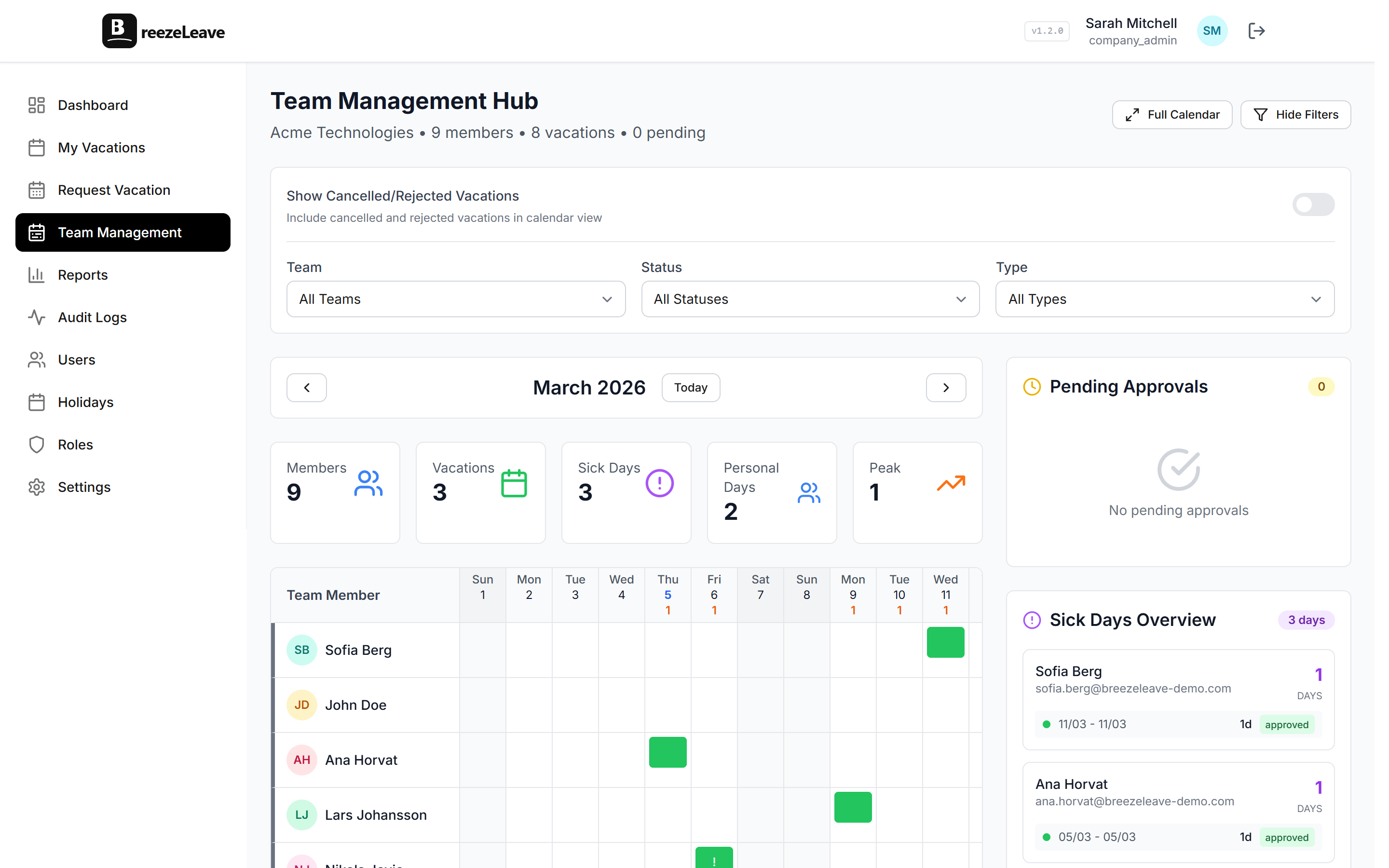
Not all calendar views are equal. A list of names and dates is technically a calendar, but it doesn't tell you what you need to know at a glance. A good shared team vacation calendar shows three things immediately:
1. Who is off and when
The display matters. You want a visual timeline, not a table. Color-coded bars across a week or month view so you can see overlap patterns without reading individual rows. When three people have overlapping bars in the same week, that's a coverage problem you can spot in half a second.
2. What type of leave it is
Vacation and sick leave are different situations. If someone is on a planned two-week vacation, you plan around it in advance. If someone called in sick this morning, you adjust today. The calendar should distinguish between:
- Vacation
- Sick leave
- Personal days
- Parental leave
- Any other categories your policy defines
Different colors, clear labels.
3. Team coverage at a glance
How many people on the team are available on any given day? This is the number managers actually care about. Not "who specifically is out" but "do we have enough people?" A good team vacation overview shows coverage as a percentage or a simple count so you don't have to manually add up who's present.
How Managers Use a Shared PTO Calendar for Planning
Sprint planning with incomplete attendance data is a recipe for missed commitments. You scope work for 5 developers. Two of them are off for three of the ten sprint days. That is 30% less capacity than you planned for, and you don't realize it until the sprint is already behind.
A team leave calendar fixes this by making future absences visible at the moment you're making plans. Opening the calendar before sprint planning takes 10 seconds. You see that Alex is out Monday through Wednesday and Priya is gone all of next week. You scope accordingly. No surprises.
The same applies to:
- Project deadlines
- On-call rotations
- Client commitments
Any time you're assigning work for a future period, you need to know who will actually be there. Guessing and hoping is not a strategy. Looking at the calendar is.
This is a big part of why we built the team calendar view in BreezeLeave. The approval workflow is important, but the calendar is what managers open every week. It is the operational tool, not the approval queue. If you want to go deeper on how overlap detection works alongside this, our guide on preventing team vacation conflicts covers the mechanics.
How Employees Benefit from a Team Vacation Overview
This is the part that gets overlooked. Shared vacation calendars are not just a management tool. They help employees too.
Picking vacation dates is stressful when you have no visibility. You want to take the last week of July, but you don't know if half your team already booked it. So you ask your manager, who checks with someone else, who checks the spreadsheet, and three days later you get a "should be fine, I think." Not exactly confidence-inspiring when you're about to book flights.
With a shared PTO calendar, employees can check coverage themselves before submitting a request:
- Open the calendar.
- See that July is mostly clear except for the 14th through 18th when two people are already out.
- Pick your dates with confidence.
- Submit. Done.
No asking around. No waiting for answers. No accidentally booking the same week as three teammates and getting your request denied after you already told your family the dates were confirmed.
For more on building a policy that supports this kind of self-service planning, take a look at our guide on vacation policies for remote teams.
The "Who's Away" Widget: Your Daily Snapshot
A full calendar view is great for planning. But most days, you don't need the full picture. You need the answer to one question: who's not here right now?
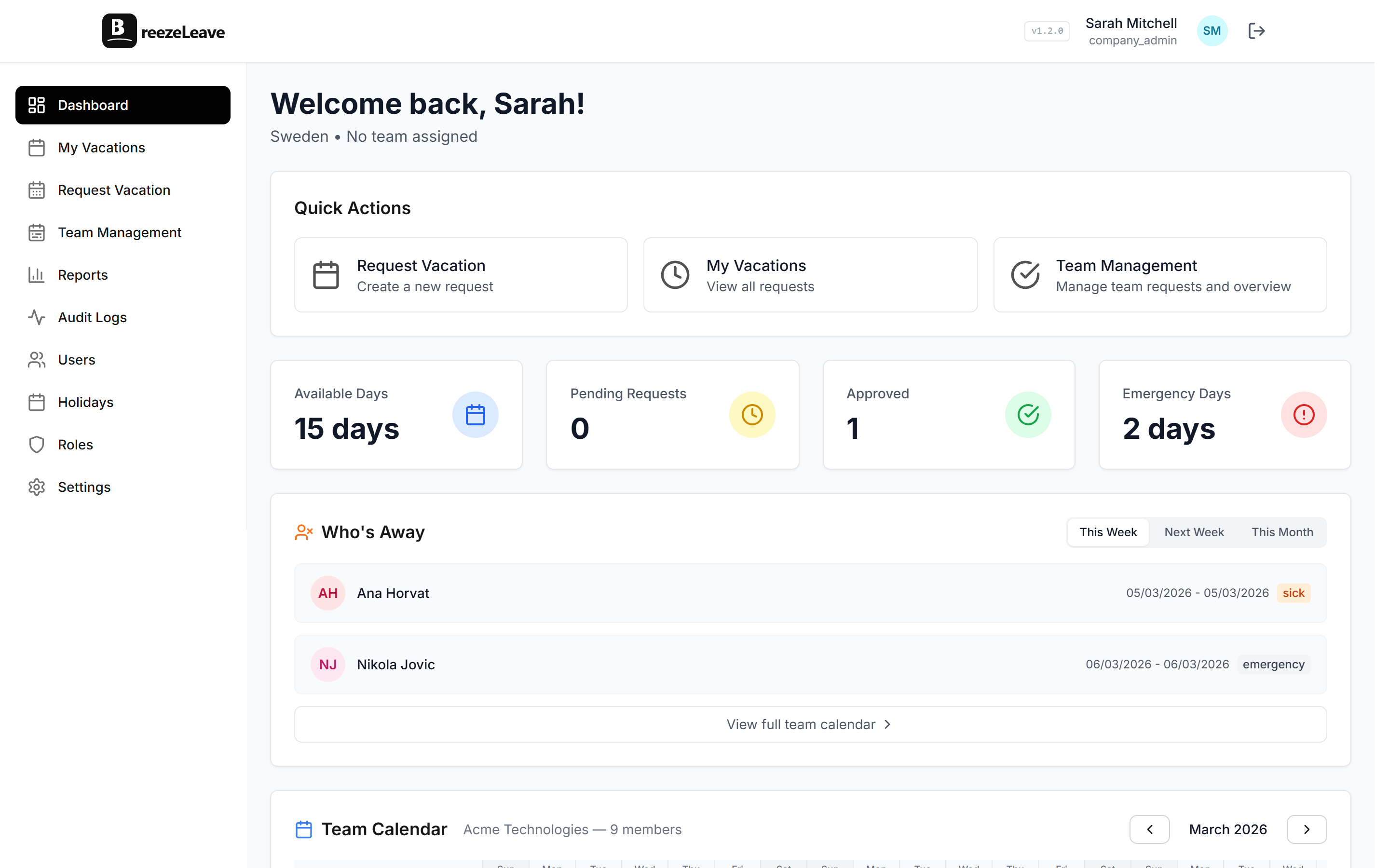
That's what a "Who's Away" dashboard widget does. It sits on the main screen, always visible, always current:
- Today's absences at the top
- This week's absences below
- Names, leave types, return dates
Five seconds of looking and you know the state of your team.
This is the thing that replaces the Monday morning Slack question. Nobody asks "is Sarah around?" because the answer is right there on the dashboard. It is passive information. Always available, zero effort to access.
Quick math
A 40-person company where "who's off" gets asked 5 times a day. Each question takes 3 minutes to resolve (checking Slack, DMs, spreadsheets). That is 15 minutes a day, 75 minutes a week, roughly 65 hours a year spent answering the same question. A dashboard widget makes it instant. That time comes back.
For teams that live in Slack, this pairs well with a Slack vacation bot that lets you type a command and get the same information without leaving your chat window. But the dashboard widget is the default, always-on version.
What Happens When You Don't Have One
The cost of not having a shared team vacation calendar is invisible because it's distributed across dozens of small moments. No single incident. Just friction.
- Meetings scheduled with people who are on PTO. Rescheduled. Time wasted for everyone who did show up.
- Sprint commitments based on wrong headcount. Work slips. The team looks slower than it is.
- Managers approving requests blindly. Three people off the same week. Understaffing. Stress for whoever is left.
- Employees hesitant to book time off because they can't tell if it will conflict. They delay, they ask around, and sometimes they just don't take the days at all.
None of these are catastrophic on their own. All of them together create a team that feels disorganized even when the people on it are perfectly competent. The missing piece is visibility, not effort.
Making the Switch
If your team is still running on a combination of Slack messages, spreadsheets, and memory, moving to a proper shared team vacation calendar is one of those changes where the "after" feels so obvious you wonder why you waited.
The setup is not complicated. In BreezeLeave, you add your team members, set their leave entitlements, and the calendar starts working immediately. Every approved request shows up on the shared view. Every team member can see who's off. Every manager can plan with real data instead of guesses.
You don't need a perfect vacation policy to start. You don't need to migrate years of historical data. You need a calendar that shows the truth about who's available, updated automatically, visible to everyone who needs it. If your team has grown past the point where everyone just "knows" what's going on, that's the moment to set this up. For a broader look at the full transition, our guide on vacation tracking for growing teams walks through the complete process.
Start with the calendar. Everything else gets easier from there.