
A resource manager at a 35-person creative agency opens Monday with the same problem every week: five active projects, three retainers, two newly signed deals, and a calendar where the senior designer is already on approved leave for the same window two clients expect work. The roster looks full. The week is not. That gap is what agency resource planning is supposed to fix.
Resource planning agencies live or die on it because the product they sell is people-hours. A plan that ignores leave, country holidays, fractional contracts, or retainer commitments is a plan that will collide with reality inside a week. BreezeLeave is agency staffing software built around that exact constraint: who is genuinely free, in which role, on which day, for which client.
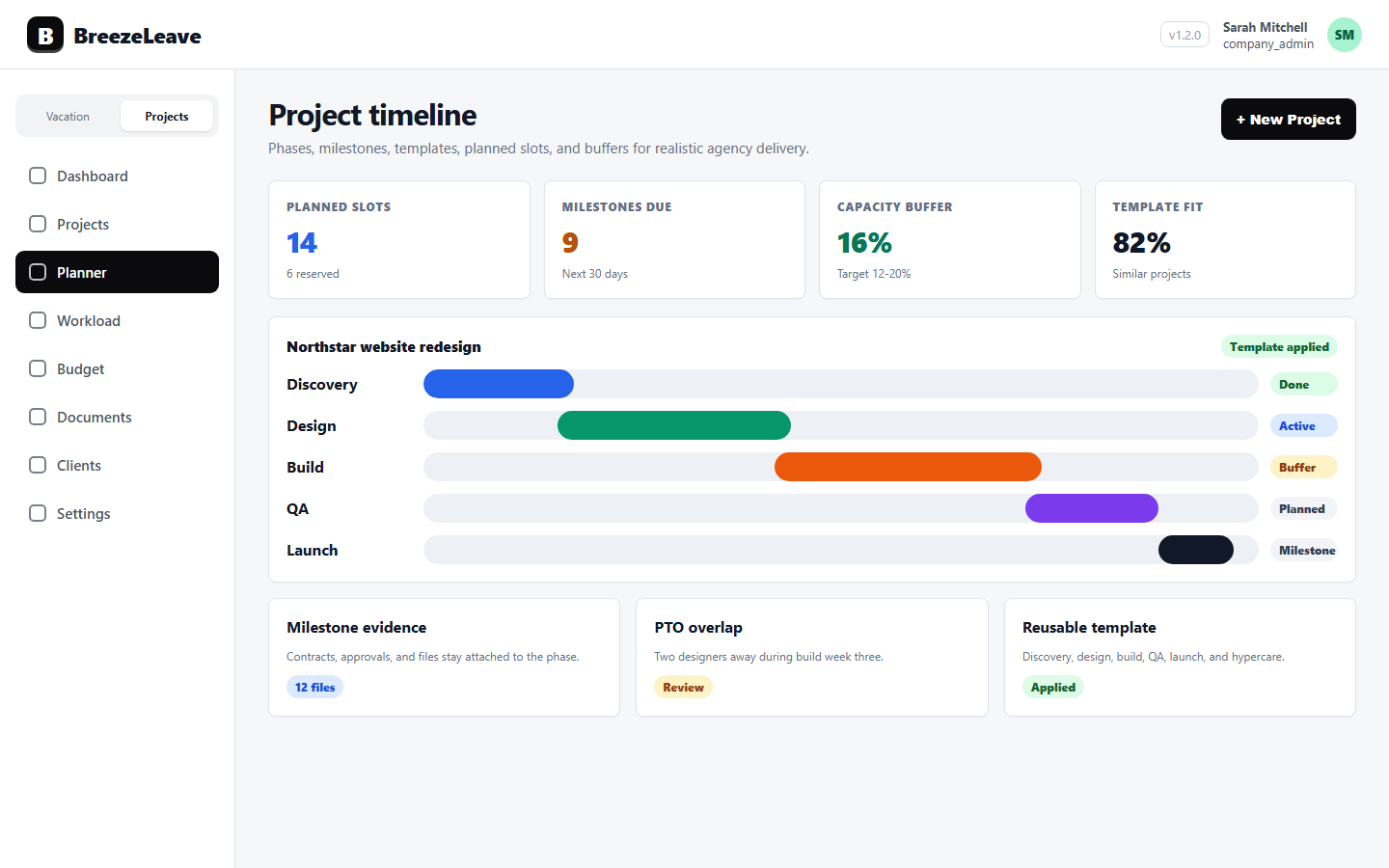
What agency resource planning has to cover
A useful resource plan answers a small number of operational questions every week. The role of the software is to make those answers honest instead of optimistic.
- Which roles are scarce. Most agencies do not run out of people. They run out of a specific role: a senior strategist, a motion designer, a back-end developer. The plan has to show role-level demand against role-level supply.
- Who is actually free. Availability is headcount minus approved leave, country holidays, retainer commitments, and the planned work already on the calendar. Headcount alone is not capacity.
- How retainers eat the week. Retainer hours are not optional. A 40-hour monthly retainer is a real allocation that reduces what is left for new project work.
- Where unplanned work goes. A signed deal does not always need to start on Monday. The plan has to give intake a place to land before it overwrites the schedule.
- How fractional people count. A four-day designer at 0.8 FTE, a freelancer committed for two days a week, and a full-time developer at 1.0 FTE all need to roll up correctly into the availability number.
Why shared sheets break for resource planning agencies
Most agencies start with a shared spreadsheet: rows for people, columns for weeks, cells for the project someone is on. It works at six people and one country. It breaks somewhere between fifteen and twenty-five, usually around the time a second country is added or the first long-term retainer is signed.
Shared sheets break in predictable ways. Leave gets entered in one tool and capacity in another, so the resource grid thinks the senior developer is free during the same week they are on vacation. Public holidays for one country are pasted in once and never refreshed. A retainer is set up in the contract but never carved out of the planning grid, so the retainer team is double-booked onto a new project. Fractional staff sit at 1.0 because nobody wanted to redo the formula.
The result is a plan that always looks fine on Friday and goes sideways on Tuesday. Resource planning software for agencies has to close those specific gaps, not just put the same grid in a different interface.
How BreezeLeave handles agency resource planning
BreezeLeave treats resource planning as the connection point between leave, projects, retainers, and time. The same record that approves a vacation request reduces the available hours in next month's plan. The same team that owns a retainer shows up as a reserved allocation in the planner. The same FTE value drives both balance accruals and capacity rollups.
Roles, demand, and named assignments
Each project carries role-level demand: how many senior developer hours it needs, how many designer hours, how many strategy hours. The planner places named people into those role slots and shows the gap when demand exceeds available role capacity. A delivery lead can see the senior developer queue is full three weeks out without scrolling through every project.
FTE for mixed teams
Every person has an FTE value. A full-time employee is 1.0, a four-day employee is 0.8, a freelancer who commits to two days a week is 0.4, and a variable contractor can be set to the hours they have agreed to. The capacity number for next week is the sum of those FTEs, minus the leave and holidays in that window. Mixed teams stop hiding inside an averaged headcount number.
PTO-aware availability
Approved leave from BreezeLeave's leave management feeds the planner automatically. Public holiday calendars per country reduce the working days for people in that country, so a delivery week in Sweden looks different from a delivery week in Croatia during the same June. There is no second tracker to keep in sync. Learn more about how that data flows in our piece on FTE planning for mixed teams.
Planned slots for unplanned work
Signed deals do not always have a clean start date. A planned slot is a placeholder that carries the role demand, estimated hours, and target dates without committing named people yet. The resource manager can review unplanned work against the next four weeks of capacity and decide where it really fits, instead of forcing it onto an already-overloaded calendar.
Retainers as real allocations
A monthly retainer is configured once with the allocated hours and the retainer team. Those hours sit on the planner every month as a reserved block, so the senior strategist on a 20-hour retainer for Client A is not accidentally booked for 40 hours of fresh project work from Client B in the same week.
A weekly rhythm a resource manager can run
Resource planning works when it has a stable cadence. The goal is not a perfect plan, it is a plan that survives contact with leave requests, scope creep, and new business.
- Monday review. Open the planner. Look at the next four weeks. Check role coverage, PTO gaps, and retainer commitments before any new request lands.
- Intake check. Walk through unplanned slots from sales handoff. Decide which ones can start, which need to wait for capacity, and which need a different role mix.
- Capacity adjustments. If a role is overloaded, decide whether to push dates, swap people, bring in a freelancer, or have the conversation with the client now rather than on the deadline.
- Leave reconciliation. Approved leave requests already feed the planner. Pending requests for high-pressure weeks get reviewed against committed work before they turn into a coverage gap.
- Friday close. Compare logged hours to planned hours from ClickUp. If a person is over plan three weeks running, the plan is wrong, not the person.
For the deeper version of this rhythm, see our guide on resource planning for agency projects.
Resource planning vs capacity planning
Resource planning and capacity planning are related but not the same. Capacity planning asks "do we have enough hours overall in this window." Resource planning asks "do we have the right roles, the right people, and the right named assignments for the work we owe." BreezeLeave covers both, but the planner view is built around the resource question, while the workload and capacity views are built around the capacity question.
For a side-by-side breakdown, read our comparison of capacity planning vs resource planning for agencies.
Operator note
Agency resource planning gets easier when the same system holds leave, roles, FTE, retainers, and project assignments. The hard part is keeping all of those numbers honest at the same time. That is the work the software is doing in the background.
Where this fits in the agency stack
Resource planning is one piece of a broader picture for agencies. BreezeLeave also covers project capacity planning for delivery commitments, workload and capacity planning for week-to-week load and utilization, and dedicated views for budgets, documents, and client work. The deeper context for agency operations sits on the BreezeLeave for agencies page.
Project Operations add-on
Project Operations is an add-on to BreezeLeave. $8/user/month, or $6/user/month with annual billing (save 25%). 14-day free trial. Add at signup or anytime from billing.
Frequently asked questions
Everything you might want to know before getting started. Still have questions? Reach out anytime.
Agency resource planning is the process of matching client work to the right people across roles, skills, and time. It covers role demand, named assignments, fractional FTE for part-time staff and freelancers, PTO, public holidays, and the planned slots that turn a signed deal into a realistic delivery week.
Project management tracks tasks, deadlines, and statuses on individual projects. Resource planning sits above that and asks whether the agency as a whole has the right people, in the right roles, at the right time. A resource plan covers many projects, retainers, leave, and unplanned intake at once.
Yes. Each person carries an FTE value, so a full-time strategist sits at 1.0, a four-day designer at 0.8, and a variable freelancer can be configured for the hours they commit to. Capacity rolls up from these values instead of pretending everyone works the same week.
For agencies, yes. A team can look fully staffed on paper and still be unavailable because of approved vacation, sick leave, or public holidays in a specific country. BreezeLeave folds approved leave and the right country holiday calendar into the availability number you plan against.
Retainers reserve a chunk of capacity every month for a named client. A monthly retainer of 40 hours from a senior developer is a real allocation against that developer, not free time waiting to be booked. BreezeLeave treats retainer allocations as a first-class slot beside project work.
Resource managers, delivery leads, and operations leads at digital, creative, marketing, and consulting agencies. It is built for agencies running a mix of retainers, fixed-fee projects, and time-and-materials work across countries and roles.
Pricing and getting started
BreezeLeave is free for teams of up to 10 people, including the project planning and resource capabilities. Agency-scale plans bring in the project module for larger rosters and more retainers. Current details live on the pricing page.
Setup for resource planning takes about an afternoon. Import people, set their FTE and country, connect Slack or Teams for leave notifications, define the roles your projects consume, and start placing the next four weeks of work into planned slots. The first useful signal usually shows up the first time a leave request changes the available hours for a week the team has already committed.