
Picture a 15-person team split between Stockholm, Zagreb, and London. The Swedish designer takes the week of Midsommar off. The Croatian developer is gone for Statehood Day. The UK product manager is in the office both weeks. Three different balances need to land at the right number, three different holiday calendars need to be respected, and an approver in any of those cities needs to see the right picture before clicking approve.
Doing this in a spreadsheet means someone spends the first Monday of every month reconciling. Someone misses an Easter Monday in Croatia (it is a public holiday there; the UK observes it too; Sweden does not). A new hire in Stockholm gets the global 20-day default instead of the local 25. The numbers are close enough to look right and wrong enough to cause a payroll discussion later.
The fix is not more cells. It is a system that knows which country each person sits in, applies the correct holiday calendar, calculates working days off that calendar, and stores the per-country defaults so a Croatian hire never starts with a Swedish allowance.
A worked example: Sweden, Croatia, and the UK
Walk through a single week in May 2026. The Monday is a UK bank holiday (Early May Bank Holiday). It is a normal working day in both Sweden and Croatia. Three employees on the same team each request the full week off, Monday to Friday.
- UK employee: requests five calendar days. The Monday is a bank holiday on their calendar, so the balance deducts four days.
- Swedish employee: requests the same five calendar days. No Swedish public holiday falls in that window, so the balance deducts five days.
- Croatian employee: requests the same week. No Croatian public holiday lands inside that window, so the balance deducts five days.
Same request form, same date range, three different deductions. Each employee sees the breakdown before submitting. The approver sees the same breakdown when reviewing.
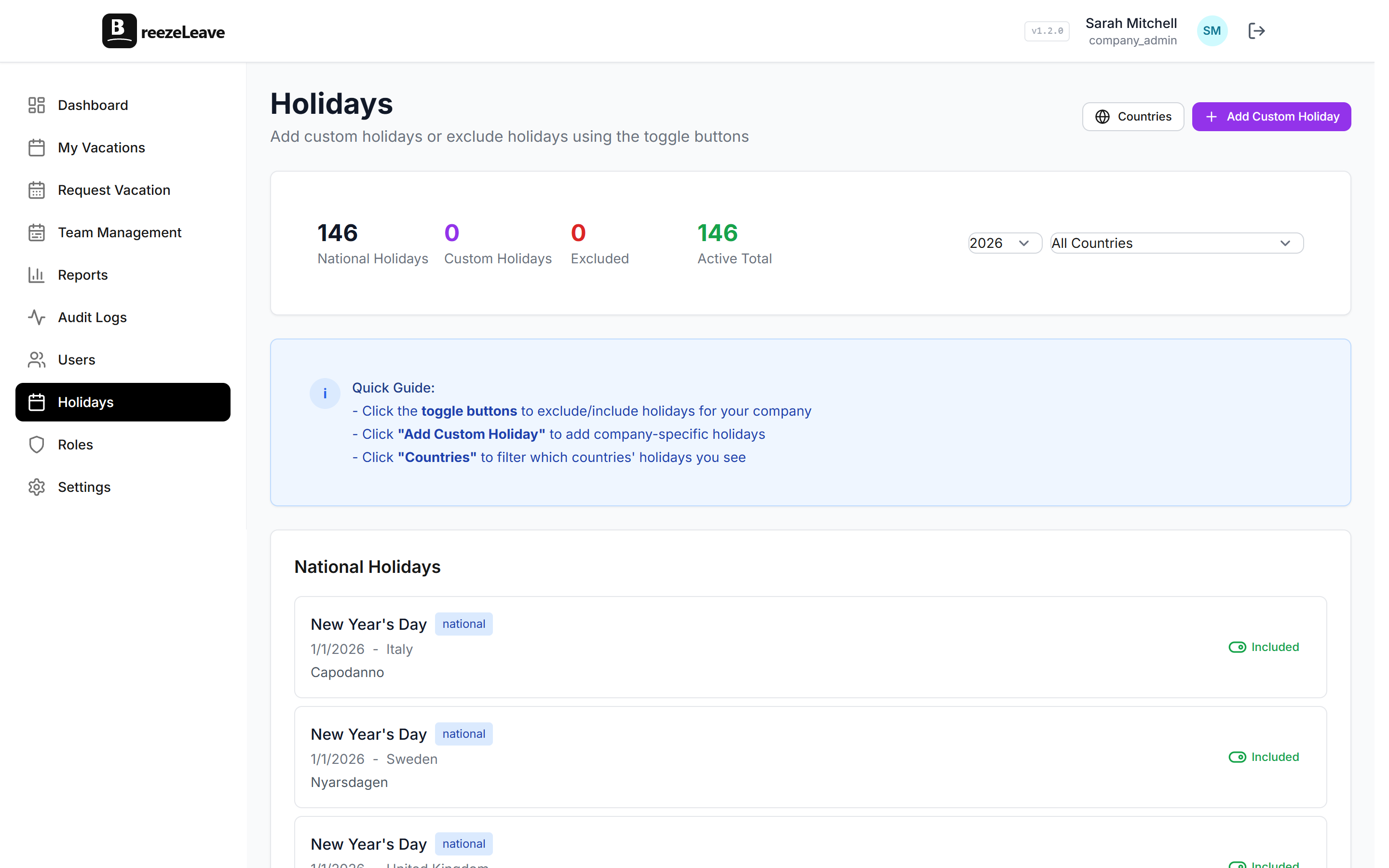
Per-country defaults that auto-populate on new hires
Open company settings, find the country defaults table, and set the base allowance you give in each country where you employ people. Sweden 25 days. Croatia 20 days. UK 25 days. United States 15 days. When you invite a new employee and pick their country, the allowance fills in to match. You can still override per person if you promised an extra five days during the offer stage.
The same settings page holds your global fallback, used when an employee’s country has no specific default configured. That means you do not have to define every country up front. Configure the four or five you actually employ in, and the rest inherit the global value.

For a closer look at how the rule layer enforces these defaults during request review, the vacation rules engine page shows the full set of checks that fire on every submission.
Country profiles cover holidays only, not labor law
BreezeLeave knows the public holidays for over 240 countries. It does not know the specifics of every labor code, sick-leave entitlement, or parental-leave statute. Those rules vary too much by country, sector, and individual contract. The product treats country as a calendar attribute and an allowance default. The legal interpretation stays with your HR team or your local counsel.
Three concrete patterns that tend to come up in cross-border setups:
- Separate sick-leave type for European employees. Many EU jurisdictions treat sick leave as a distinct entitlement from vacation. Create a Sick Leave type with its own balance and assignment rules so European employees do not draw down their vacation pot for medical absence.
- Combined PTO bucket for US employees. Many US companies fold vacation, personal, and sick into a single pool. Configure a single PTO type for that group while leaving the dedicated sick-leave type active for European colleagues.
- Region-specific custom holidays. A regional patron saint day or a city public holiday that is not in the country-level list can be added as a custom holiday scoped to the right group of employees.
Where the working-day math lives
Every time an employee picks a date range, the system runs three checks before the balance update is calculated:
- Strip out Saturdays and Sundays from the range.
- Strip out any public holidays in the requester’s country calendar.
- Strip out any custom company holidays scoped to that employee’s group.
Whatever is left is the deduction. The request review screen shows each step so you can verify the math at a glance. If something looks off (a holiday missing, a custom day not applying), it is usually a configuration issue on the country profile, not an unexplained calculation.
Visibility across the team without flooding chat
Holiday calendars are useful for the people they apply to. They are also useful for everyone else trying to schedule a meeting. The shared team calendar in BreezeLeave shows approved leave alongside public holidays for every country represented on the team. A project lead in Zagreb planning a Wednesday call can see at a glance that half the Swedish team has Midsommar booked off that day.
For teams that live in chat, the Slack and Microsoft Teams integrations post the daily who-is-off summary into the channel of your choice. The summary respects the per-country calendar, so it does not flag a Swedish employee as out when their day off is just a UK bank holiday in your London office.
Multi-company support when entities are separate
Some organizations register a separate legal entity in each country. The Swedish AB, the Croatian d.o.o., and the UK Ltd each have different signatories, different approval chains, and different leave policies. BreezeLeave’s multi-company support lets each entity run as its own company under a shared login. Approvers see only the entity they belong to; an admin can switch between them without logging out.
The multi-company leave management guide walks through when entity separation is the right call versus keeping everyone in one company with country assignments.
Getting set up
- Pick your country list. List every country where you currently employ people. Open Settings, find the country defaults table, and set the base allowance for each one.
- Assign country on each user. On the Users page, pick the country for each employee. The matching public holiday calendar attaches automatically.
- Create the leave types you need. A single PTO type for combined US-style allowances, plus a separate Sick Leave type for European employees, is a common starting point.
- Verify on one request. Have an employee from each country submit a test request that crosses a public holiday. Confirm the deduction matches your expectation before turning the system over to the rest of the team.
Related reading
- Managing PTO across countries covers the policy questions that come up before the system is configured.
- Sick leave tracking in Europe breaks down statutory sick pay across major European markets.
- Leave management for remote teams covers the timezone, async approval, and Slack visibility pieces that pair with the country setup.
- See pricing for team-size tiers (free up to 10 employees).
Frequently asked questions
Everything you might want to know before getting started. Still have questions? Reach out anytime.
Working days are calculated from the requested date range minus weekends and minus public holidays for the requester's assigned country. If a Stockholm employee asks for a week off and the Wednesday is a Swedish public holiday, the balance is deducted four days, not five. The same week off for a London colleague (where the Swedish holiday is just another Wednesday) would deduct five days. The deduction breakdown is visible on the request itself so an approver can verify before clicking approve.
BreezeLeave ships with public holiday data for over 240 countries and territories. When you assign a country to an employee, that country's calendar attaches to them. Holidays that move year to year (Easter Monday, Whit Monday, observed days for fixed-date holidays that fall on a weekend) are recalculated automatically. You can add company-specific extras (a founder's day, a regional patron saint day, a Friday-after-Thanksgiving closure) on top.
Yes. A team in BreezeLeave is a grouping for reporting and approval routing. Country is set per employee on the user profile. A designer in Zagreb and a developer in Stockholm can sit on the same engineering team, share the same project, route to the same approver, and still see different public holidays on their personal calendar.
BreezeLeave does not enforce statutory minimums as a legal compliance layer. It does let you set a per-country default allowance, so a Croatian hire defaults to your Croatia allowance instead of your global default. The compliance call still sits with HR. The product is a tracking and configuration tool, not a legal advisor for any specific jurisdiction.
Multi-company support lets each entity run its own approval chain, leave types, and policies under one login. Read more on the Multi-Company Leave Management blog post for setup detail. If your group is a single entity with employees abroad, you can keep everyone in one company and use country assignment instead of entity separation.
BreezeLeave currently treats Saturday and Sunday as weekends by default. If you have an employee in a country with a different working week, contact support so we can flag the case. Public holidays for those countries are still applied; the weekend definition is the part that may need a custom setup.