
Picture the founder of a 35 person company on a Thursday afternoon, copying vacation totals from a Google Sheet into a payroll run. Three rows are highlighted yellow because the formulas broke last month when an engineer was added in the middle of the page. One person is on a remote contract and their public holidays are different. Another booked a long weekend that nobody approved, and now there is a hallway conversation about whether it counts. This is the week most growing teams decide to find a vacation tracker that is not a spreadsheet.
BreezeLeave is built for that moment. The vacation balance lives next to the request, the approval lives next to the calendar, and the carryover rule runs itself at year end. The rest of this page covers how the pieces fit together and what to expect when you switch over.
Why teams replace the vacation spreadsheet
The vacation spreadsheet is a great prototype. It is a poor system of record once any of the following becomes true:
- You have more than 15 people, and balances now depend on hire dates instead of a flat annual grant.
- Someone joined or left mid-year and the pro-ration math became a manual job.
- An employee is in a different country and their public holidays should not deduct from the balance.
- Two managers are involved, and approvals happen partly in Slack, partly in email.
- Year-end carryover requires a fresh tab and a few hours of copy-paste.
Vacation tracking software fixes each of these by making the balance, the approval, and the calendar the same object. When the approver clicks accept, the balance moves, the team calendar updates, and the change is logged. Nobody has to remember to update a second sheet.
What the BreezeLeave vacation tracker covers
The product centers on four things that have to be right: the balance, the request, the approval, and the shared calendar. Everything else is built around those four.
Live vacation balances
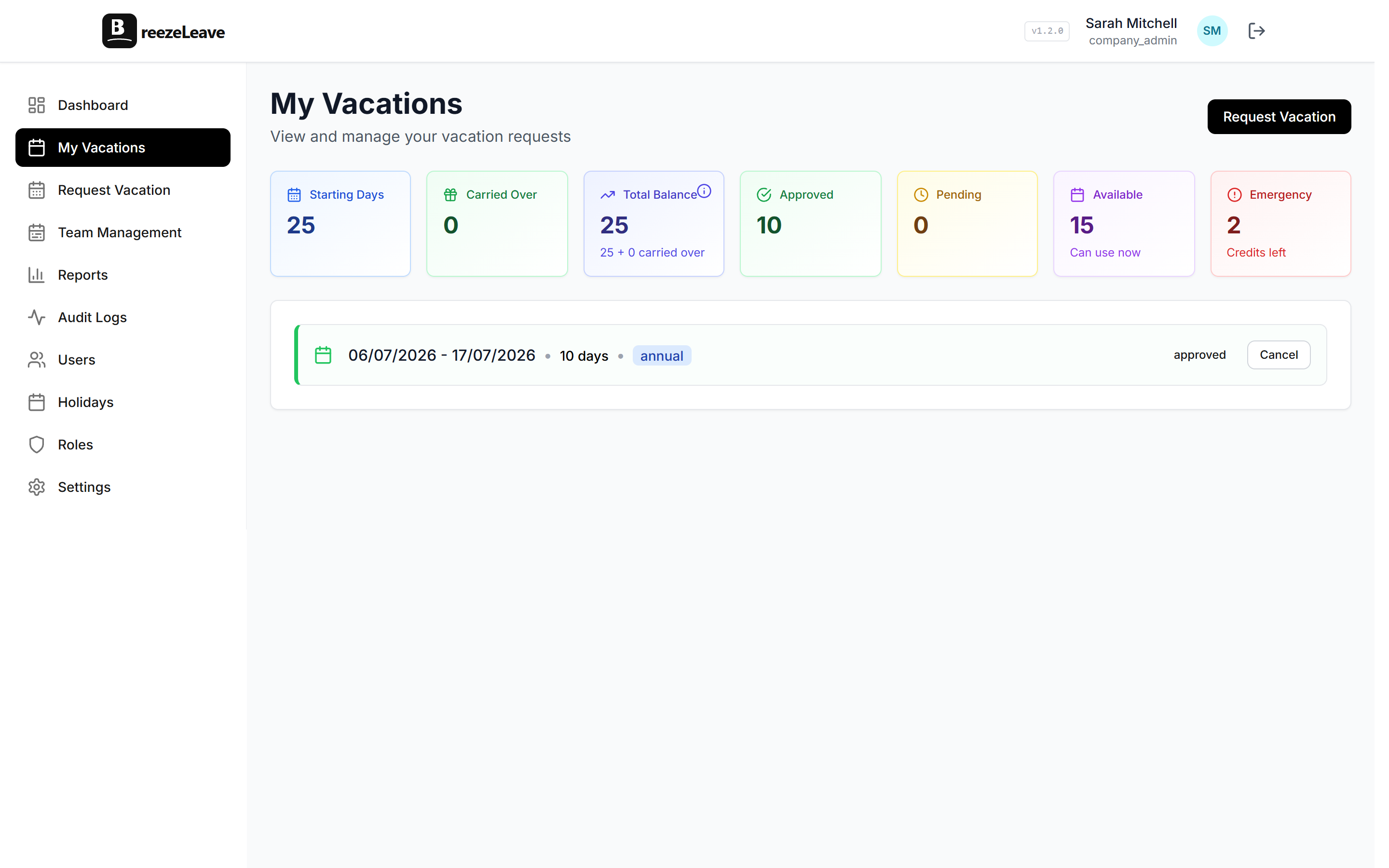
Every employee sees their current vacation balance the moment they open the app. The balance preview shows the projected deduction before they submit a request, so there is no "wait, do I actually have those days?" moment. Half-day requests are supported, and carryover days appear as a separate line so people understand what will expire.
Accrual schedules and seniority tiers
Most growing teams start with a flat annual allowance, then add accruals when the headcount grows. BreezeLeave handles both. Configure annual, monthly, bi-weekly, or custom accrual rates per leave type. Seniority tiers can auto-promote employees to higher allowances at the 3 year and 5 year marks. The accrual runs in the background and writes to the audit log every time it touches a balance.
Carryover with caps and expiry
Year-end carryover is where the Sheets approach usually breaks. BreezeLeave applies the company carryover rule automatically: cap at 5 days, expire by March 31, or no carryover. Each employee sees the carryover line and the expiry date so they can plan a trip before the days disappear.
Requests and approvals
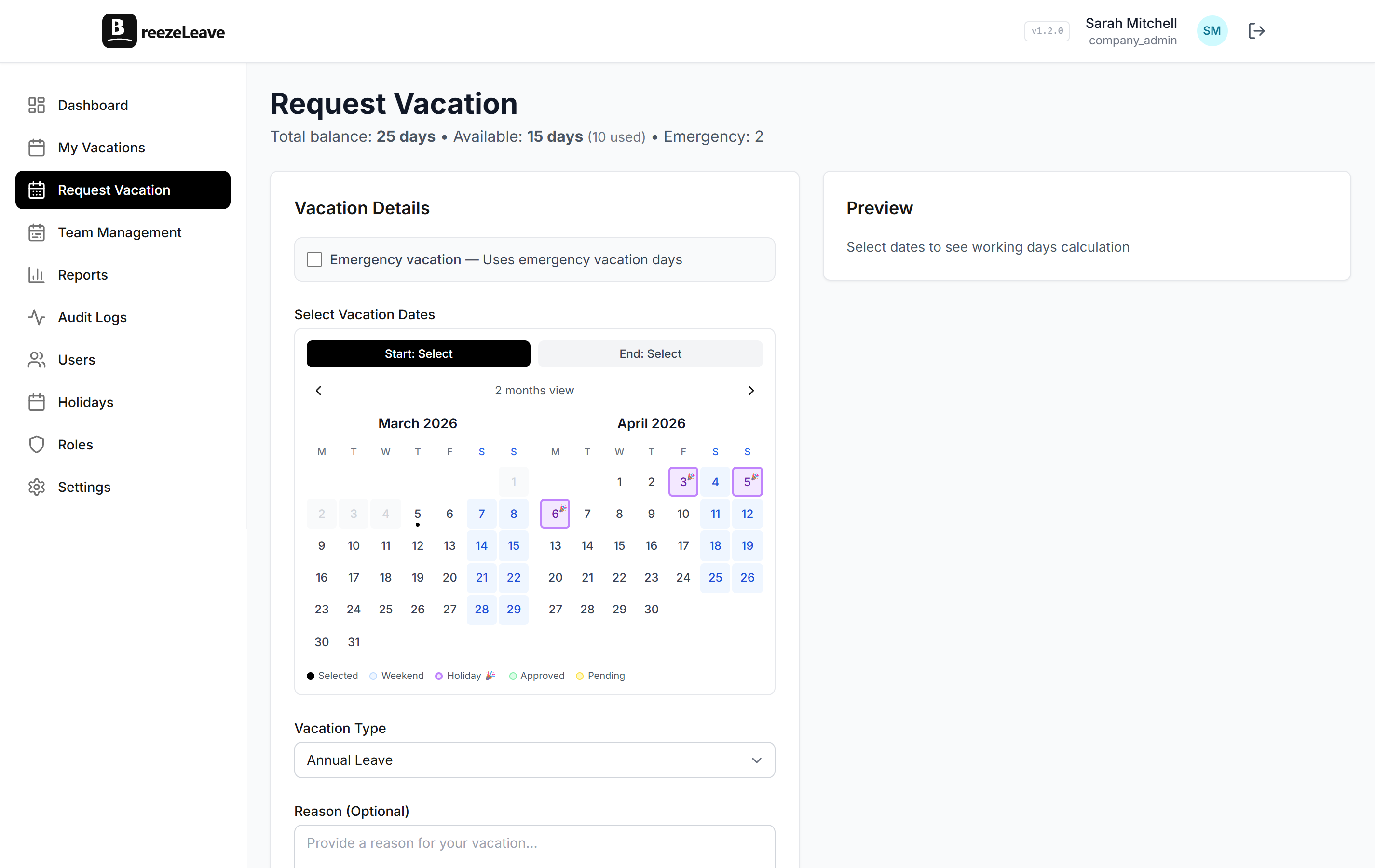
An employee picks dates, sees the projected balance, and submits. The approver gets a notification in Slack, Teams, or email. The team calendar is visible inline, so the approver can spot conflicts before clicking accept. The default is a single approver per team, but you can switch to multi-step approval, role-scoped approvers, or majority voting on the multi-approval page.
Shared team calendar
The shared calendar is the part most teams notice first. Approved absences show up filtered by team, country, leave type, or department. Employees can see who is off next week. Managers can plan around it before approving the next request. There is a dedicated employee vacation calendar page with the calendar in more detail.
Country-aware working days
Each employee has a country, and the tracker uses that country's public holidays when it calculates working days. A request that overlaps a public holiday does not deduct the holiday from the balance. Custom company holidays can be added on top.
Pro tip
When you switch from a vacation sheet, import the current balance as a starting number rather than re-running historical accruals. That avoids a long argument about whose balance looks different on day one.
A typical week in the vacation tracker
Here is what a week looks like for a 40 person team using BreezeLeave as their vacation tracker:
- Monday. A developer requests next month off. The balance preview shows 7 working days deducted (a public holiday lands in the middle and is excluded).
- Tuesday. The team lead gets a Slack notification. They click the calendar link, see one other person off that week, and approve.
- Wednesday. The shared calendar updates. The dev's balance drops by 7 days. The audit log records the approval.
- Thursday. A new hire's accrual runs. Their starting balance appears pro-rated for the months remaining in the year.
- Friday. The "who is out next week" digest is posted to the team Slack channel so the rest of the team knows what to expect Monday.
The full annual cycle is covered in the vacation tracking for growing teams blog post.
Spreadsheet to vacation tracker, what changes
The day-one experience is the same form-and-calendar pair, just with the math handled for you. The behind-the-scenes shifts are what saves time month over month.
| Job | Spreadsheet | BreezeLeave |
|---|---|---|
| Live balance lookup | Find row, check column, hope formula is right | Dashboard, updated on every approval |
| Mid-year hire pro-ration | Manual calculation | Automatic from start date |
| Public holiday exclusion | Cross-reference holiday list | Built-in per country |
| Carryover at year end | Fresh tab and copy-paste | Rule runs on the configured date |
| Approval record | Slack thread or email | Audit log with timestamp |
| Team calendar | Second tab with colored cells | Filterable shared calendar |
For a deeper side-by-side, the vacation tracker vs spreadsheet template post compares the two on real scenarios.
Notifications where the team already works
BreezeLeave sends vacation notifications to Slack, Microsoft Teams, or email. The same approval prompts work in any of the three. The default channel split is two channels per team: one for action items (new requests, decisions to make) and one for awareness (who is out today, who is back tomorrow). You can collapse it to one channel or expand to more depending on team size.
Approved vacations can also be pushed to Google Calendar, so the rest of the company sees the absence on the calendar invite they were going to send anyway. The full integration list lives on the integrations page.
Where the vacation tracker fits next to PTO and leave management
Three related pages cover overlapping ground. Use the one that matches your wording:
- The PTO tracker page uses US-style language (PTO, accruals per pay period, single bucket for vacation and sick).
- The leave management software page covers the full HR admin scenario with multi-step approvals, audit logs, and rules engine.
- This vacation tracker page covers the growing-team case where vacation is the main leave type and the shared calendar matters as much as the balance math.
Pricing and onboarding
Starter is free for small teams and includes the vacation tracker, balances, accruals, the shared calendar, and Slack or Teams notifications. Pro adds the full rules engine, multi-step approvals, and the project module add-on. Enterprise covers multi-company groups and SSO. The pricing page lists the current tiers.
Setup usually takes under an hour:
- Create the company and pick the working week.
- Add leave types and accrual rules.
- Import current balances from your sheet.
- Invite employees and assign teams.
- Connect Slack or Teams, then run a test request.
Most teams switch on a Friday and run the first real request on Monday. The new hire flow runs itself from there.
Frequently asked questions
Everything you might want to know before getting started. Still have questions? Reach out anytime.
A vacation tracker is software that records vacation requests, deducts days from the right balance on approval, and shows a shared team calendar so managers can see who is off. It replaces Google Sheets and Slack DMs as the single source of truth for time off.
BreezeLeave starts each employee with a configured annual allowance, runs accruals (monthly, bi-weekly, or custom), subtracts approved days, and applies carryover at year end. The balance updates live as requests are approved.
Yes. Each employee has a country, and the tracker uses that country's public holidays when calculating working days. You can set country-specific accrual rates and statutory minimums inside the same company.
Every approved absence appears on a shared calendar that employees and managers can filter by team, country, or leave type. Managers check it before approving new requests so they do not stack too many people off in the same week.
Yes. Vacation requests, approval prompts, and a daily "who is out today" digest can be sent to Slack or Teams channels. Approvers can decide directly from the notification.
The Starter plan covers small teams at no cost, with full vacation tracking, balances, accruals, and the shared calendar. Larger teams move to Pro or Enterprise for advanced rules and integrations. See the /pricing page for the current tiers.