
Project documents often drift into email threads, shared drives, Slack channels, and personal folders. That creates risk when a PM needs the signed scope, finance needs a contract, or a client asks for the latest delivery file.
BreezeLeave keeps documents connected to company, client, project, and milestone records so project context is not separated from the files that prove it.
This is not a generic file storage tool. It is a document layer that exists because clients, projects, retainers, and milestones already exist in the same system, and the files belong next to them.
Document problems that slow agencies down
- Signed contracts and project files are stored away from the project record.
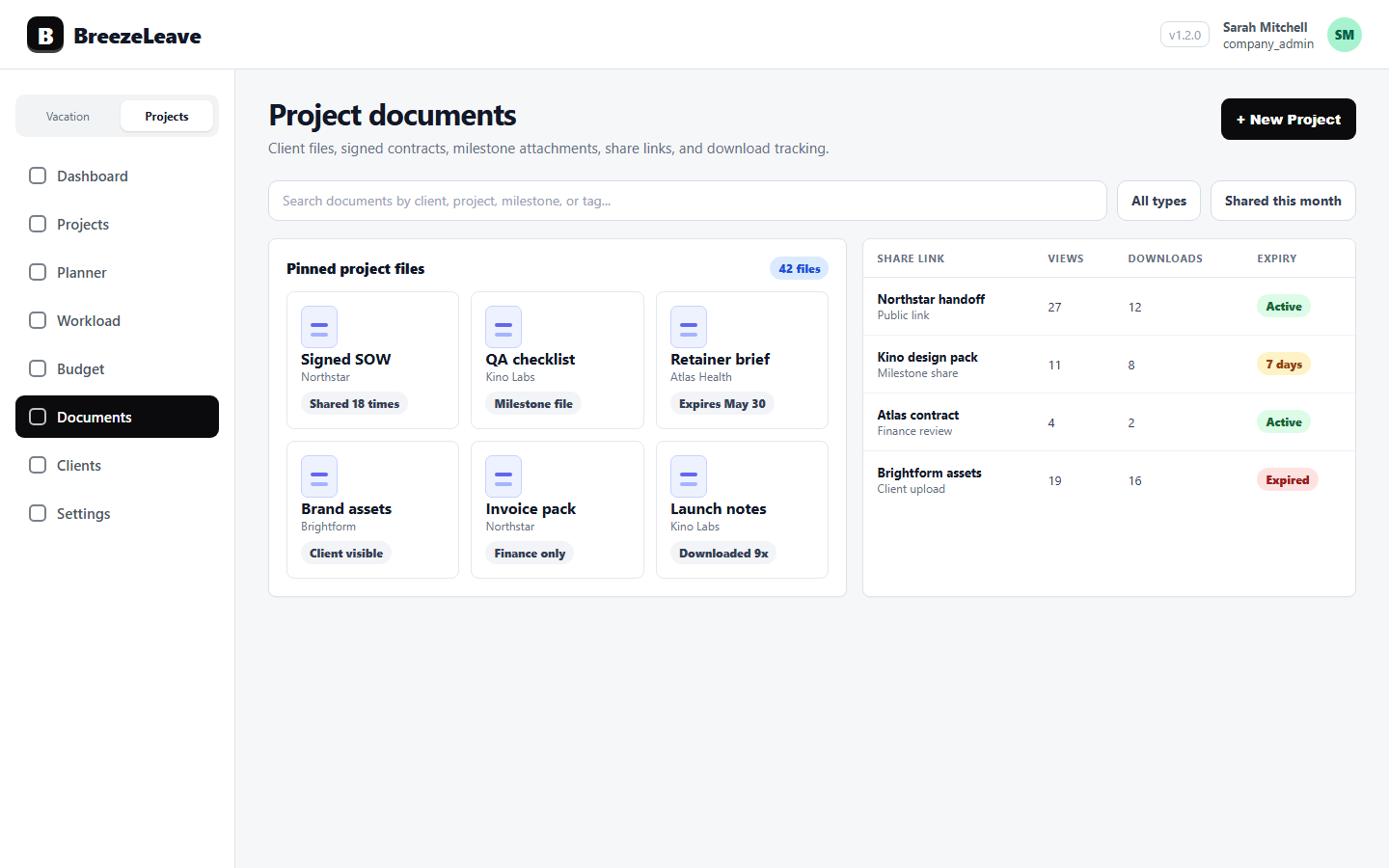
- Teams cannot tell which file was shared, viewed, downloaded, or already expired.
- Milestone documents are disconnected from the phase or delivery timeline they describe.
- Client handoff depends on someone remembering where the latest file lives.
- Shared links stay live forever because nobody set an expiry when they sent the link.
Document management features
Document library
Store company, client, project, and milestone documents with the right context attached to each file.
Thumbnails and download
Preview file thumbnails and download documents without searching through unrelated folders.
Public share links
Create share links with expiry and password protection, then track public views and downloads.
Project context
Attach documents directly to clients, projects, milestones, signed contracts, and delivery records so they travel with the work.
View and download tracking
See which shared links were opened, how often, and whether downloads happened. Useful for client handoff and audit.
Soft delete
Restore documents that were removed by mistake instead of asking the original uploader to dig through their inbox.
A cleaner document workflow
- Attach signed contracts and sales handoff files to the client or project record when they arrive.
- Store project documents and milestone files where the delivery team already reviews the work.
- Use public share links with expiry when a client needs access without adding them to the internal workspace.
- Review document stats to understand whether shared files were opened or downloaded before a meeting.
- Tie milestone files to the right phase so the project timeline carries its supporting paperwork.
Why files belong next to projects
A signed proposal is part of the project. A milestone sign-off is part of the milestone. A change-order email is part of the scope decision. Storing those in a generic drive or in a private inbox makes the project record incomplete.
When a PM opens a project, the relevant documents are right there: contract, scope, last delivery file, signed milestone, shared assets. The same is true when an account lead opens the client record.
Share links that expire on time
Public share links are useful for getting a file to a client without expanding internal access. They are also a security risk when they live forever. BreezeLeave links can carry expiry dates, password protection, and view/download tracking so a one-time delivery does not become a permanent backdoor.
After a project closes, the link stops working on its own. If you need to send the file again later, you create a fresh link with its own expiry instead of relying on the old one being safe.
Frequently asked questions
Everything you might want to know before getting started. Still have questions? Reach out anytime.
Yes. BreezeLeave supports company, client, project, and milestone documents with thumbnails, downloads, soft delete, and project context.
Yes. Public share links can include expiry, password protection, and view/download tracking so you can audit how a link was used.
Yes. Project and milestone documents can stay attached to the relevant work instead of living in a disconnected file drive.
You can set an expiry on every share link so it stops working on its own. You can also revoke active links from the document record if scope changes.
Yes. Documents use a soft delete so you can restore a file that was removed by mistake instead of asking the original uploader to find their copy.
Not exactly. Teams often keep working files in a drive and bring the documents that belong to a project (contracts, milestones, deliverables) into BreezeLeave so they travel with the project record.