
Most agencies know their hourly rate. Fewer know what each project actually cost to deliver last month. The hours are logged in ClickUp, salaries live in a payroll spreadsheet, and the bookkeeper builds the cost number once a quarter. By then it is too late to act on a project that is running over.
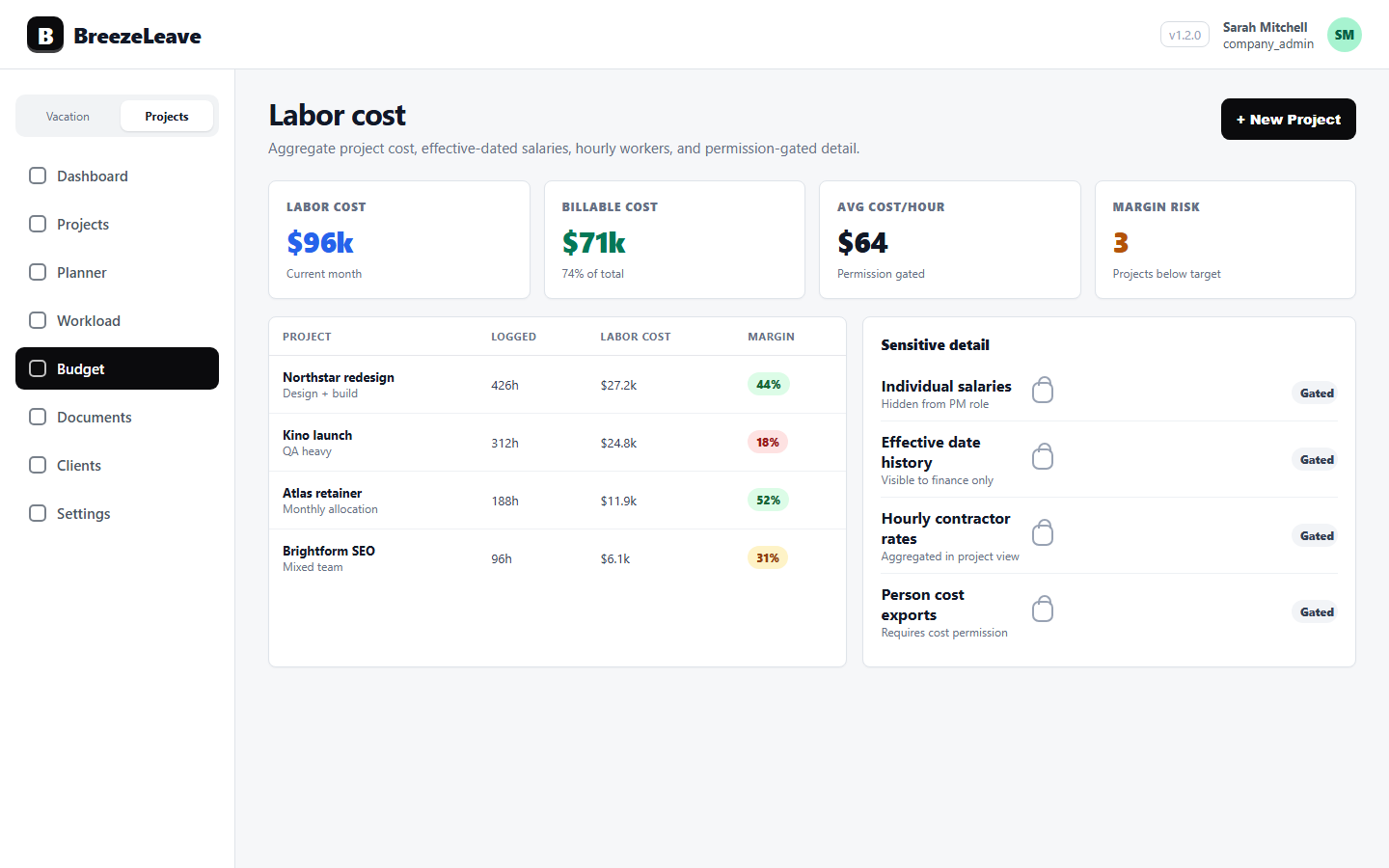
Labor cost tracking in BreezeLeave closes that gap. Salaries and hourly rates live in the product with effective dates. ClickUp time entries flow in through the workspace sync. The cost of a project equals logged hours times the rate in effect on each day, plus other categorized cost lines. Project margin updates as the month progresses.
Two things make this useful instead of dangerous: the cost math is auditable, and visibility is gated by role. A delivery lead plans workload while compensation stays hidden. A finance lead reviews margin while salary detail stays out of the whole team's view.
Why a generic spreadsheet does not work here
Agency labor cost has three properties that make a flat sheet break down:
- Salaries change. A 5 percent raise on April 1 means anything logged in March uses the old rate and anything logged from April uses the new one. A flat number in column C will silently misprice historic projects after the next salary review.
- Time is granular. Logged hours sit in ClickUp at the task level. Reconciling them to projects, phases, or retainers by hand is the kind of work that gets done once and then quietly stops.
- Sensitivity varies. A delivery lead needs project-level cost to make decisions but does not need individual salaries. A general project sheet exposes too much, so finance keeps it locked, which means delivery flies blind.
A dedicated labor cost layer fixes the math and the access control at the same time.
What labor cost tracking covers in practice
The agency labor cost software inside BreezeLeave handles four parts of the problem.
Effective-dated salaries
Each employee has a salary history with start dates. The cost calculation looks up the rate that was in effect on the day the hours were logged, not the latest one. A raise applied on April 1 leaves March costs untouched. Historic project margin stays accurate after every compensation review.
Hourly-rate workers
Some agencies run a mix of full-time staff and freelancers, or pay specialists by the hour for specific projects. Workers can be configured with an hourly rate instead of a monthly salary. Their cost on a project equals logged hours multiplied by the hourly rate that applied on each day.
Aggregate cost reporting
Category-level cost totals for a period. Individual compensation stays hidden. Finance can export monthly cost trends by category to share with stakeholders who should not see salary data. The aggregate view is its own permission key (budget_aggregate_costs_read) separate from the per-person view.
Project labor cost
Labor cost on a project equals logged hours from ClickUp multiplied by each person's effective rate. The number flows into the project budget views and into project budget tracking. Combined with revenue, it produces the margin signal that owners and finance leads use to decide which projects to keep and which ones to renegotiate.
Four permission keys, four different jobs
Labor cost data is sensitive. BreezeLeave uses four independent permission keys so each role sees only the part it needs. Read more on the role-based permissions page.
| Permission key | Grants visibility to | Typical role |
|---|---|---|
| projects_costs_read | Project-level total labor cost | Delivery lead, project owner |
| projects_person_costs_read | Per-person cost on a project (exposes salaries) | Finance lead, founder |
| projects_revenue_read | Project revenue and margin numerator | Finance lead, founder, senior delivery |
| budget_aggregate_costs_read | Category-level cost totals without per-person data | Operations lead, COO |
The split matters. A project owner can see that their project ran 18,400 EUR in labor cost last month and decide whether the scope was right, while compensation differences between team members stay hidden. A COO can review category cost trends; per-person figures stay out of that view entirely.
Permission note
The default custom roles ship with conservative settings. Most agencies grant projects_costs_read and projects_revenue_read to delivery leads, and only add projects_person_costs_read for finance and founders. The labor cost permissions guide covers a recommended setup by role.
How the cost number is built
A walkthrough of the math, because labor cost only helps if you trust where the number comes from.
- ClickUp time entries sync into BreezeLeave. Hours are attached to tasks, which are mapped to BreezeLeave projects.
- Each entry is associated with an employee. User mapping handles the case where ClickUp usernames do not match BreezeLeave accounts directly.
- The system looks up the rate in effect on that date. Salary history with effective dates means an April 1 raise applies from April 1, not retroactively to March.
- Hours are multiplied by the daily-effective rate. For monthly salaries the conversion to an hourly rate uses the configured working-hours assumption.
- Per-entry cost rolls up to project labor cost. Other categorized cost lines (software, contractor invoices, hardware) are added separately.
- Project labor cost feeds the margin calculation. Revenue minus total cost, divided by revenue, becomes the margin shown to users with the relevant permissions.
Read the labor cost tracking for agency projects article for a fuller walkthrough with worked examples.
What labor cost tracking does not do
Honest framing for buyers comparing this to a full HR system:
- BreezeLeave does not run payroll. Salaries are configured for cost calculation, not for paying employees. Connect your payroll system (Personio, Gusto, Deel, local providers) for that.
- BreezeLeave does not handle benefits, taxes, or social contributions as separate cost lines unless you add them as categorized costs.
- BreezeLeave does not capture time natively. The cost number depends on ClickUp time entries being logged. If hours are missing or wrong, the cost number is missing or wrong. The logged hours hygiene reports help catch that, but the input still needs to be honest.
- BreezeLeave does not produce statutory financial reports. It produces internal management views of project cost and margin. Your accountant still owns the P&L.
When to turn this on
Signals that an agency is ready to start tracking labor cost properly:
- You bill projects on a fixed-fee basis and want to know which ones are profitable.
- You run retainers and want to see whether logged hours are eating into the monthly allocation.
- You have a mix of monthly-salary staff and hourly contributors.
- You want delivery leads to feel cost pressure while individual compensation stays hidden.
- You already have ClickUp time entries flowing in reasonably well.
If hours are not logged reliably in ClickUp, fix that first. Cost tracking on top of bad time data produces bad numbers. The ClickUp logged hours hygiene checklist helps with that step.
Project Operations add-on
Project Operations is an add-on to BreezeLeave. $8/user/month, or $6/user/month with annual billing (save 25%). 14-day free trial. Add at signup or anytime from billing.
Frequently asked questions
Everything you might want to know before getting started. Still have questions? Reach out anytime.
Only users with the explicit permission. Labor cost visibility is controlled by four permission keys: projects_costs_read (project-level cost totals), projects_person_costs_read (per-person cost on a project), projects_revenue_read (project revenue), and budget_aggregate_costs_read (aggregated cost reporting). Each key can be granted independently, so a delivery lead can plan workload without seeing salaries.
Yes. Each employee can have salary entries with effective dates. When you change someone from 5,000 EUR per month to 5,500 EUR per month starting July 1, the cost calculation uses the right number for each period. Historic project costs do not silently change when you update a current salary.
Yes. Workers can be configured with an hourly rate instead of a monthly salary. Their cost on a project equals logged hours from ClickUp multiplied by the hourly rate that was in effect on the day the hours were logged.
Logged hours from ClickUp are multiplied by each person's effective rate to produce project labor cost. That labor cost plus any other categorized cost lines is subtracted from project revenue to produce the margin. Margin appears in the project budget views for users with revenue and cost permissions.
Yes. A project manager can be granted projects_costs_read but not projects_person_costs_read. They see the total labor cost on a project (for example, 18,400 EUR this month). The per-person breakdown that would expose individual salaries stays hidden.
Their hours show up in workload and time reports as normal, but cost columns flag the missing rate. Aggregate cost totals exclude that person until a salary or hourly rate is added with an effective date. This prevents silent zero-cost entries that would make margin look healthier than it is.
Yes. Users with budget_aggregate_costs_read can pull category-level cost totals for a period. Per-person figures stay hidden. The export is useful for monthly P&L reviews and for sharing summarized cost trends with stakeholders who should not see individual compensation.
Setting up labor cost tracking
A practical sequence for an agency owner or finance lead enabling labor cost tracking for the first time:
- Confirm permissions. Decide which roles get which of the four permission keys. Start conservative; widen access later if needed.
- Enter salaries with effective dates. Use the date the salary began, not the date you added it to BreezeLeave. Historic accuracy depends on it.
- Configure hourly-rate workers. Freelancers, hourly specialists, or part-time staff get rates instead of monthly salaries.
- Verify the ClickUp sync. Run logged hours reports for the last 4 weeks. Check no-log periods and unmapped users.
- Open a project budget view. Check that labor cost looks plausible. Compare to your previous Google Sheet estimate for the same project.
- Review margin for one closed month. Use it as the audit case before rolling cost reporting out to other roles.
Pricing for the project management add-on is on the pricing page.