
An HR admin running a 60 person team across Germany, the UK, and Brazil opens January with three different holiday calendars to maintain. Boxing Day matters in the UK. Boxing Day means nothing in Germany. Carnival Monday shuts down Brazil for half a week and the German team has no idea. A vacation that runs from December 23 to January 5 has different working-day deductions for each person on the request list. Doing this by hand is how mistakes happen.
Holiday management software replaces those date columns with a single source of truth. BreezeLeave applies the right country calendar per employee, lets you add custom company holidays on top, and calculates working days correctly when a request crosses a public holiday or a weekend. The HR admin stops being a calendar mechanic.
What multi-country holiday management has to handle
A real holiday system has to answer four questions for every leave request:
- Which country? The employee's country drives the public holiday calendar. A Berlin developer and a London developer on the same team need different holiday days counted, even when the request dates are identical.
- Which custom company days apply? Year-end closure, founder's day, an unplanned national mourning day. These sit on top of the country profile and apply to everyone or to a named team.
- Which days are excluded? A contractor in a country that does not observe a specific holiday should not get that day off the books. An exclusion lives on the policy level.
- How many working days does the request actually deduct? The balance preview on the request form must show the correct number before the employee hits submit, not after payroll runs and the discrepancy shows up.
A spreadsheet can answer one of these. Maybe two if the formulas are careful. Doing all four across more than two countries is where teams give up and buy real holiday management software.
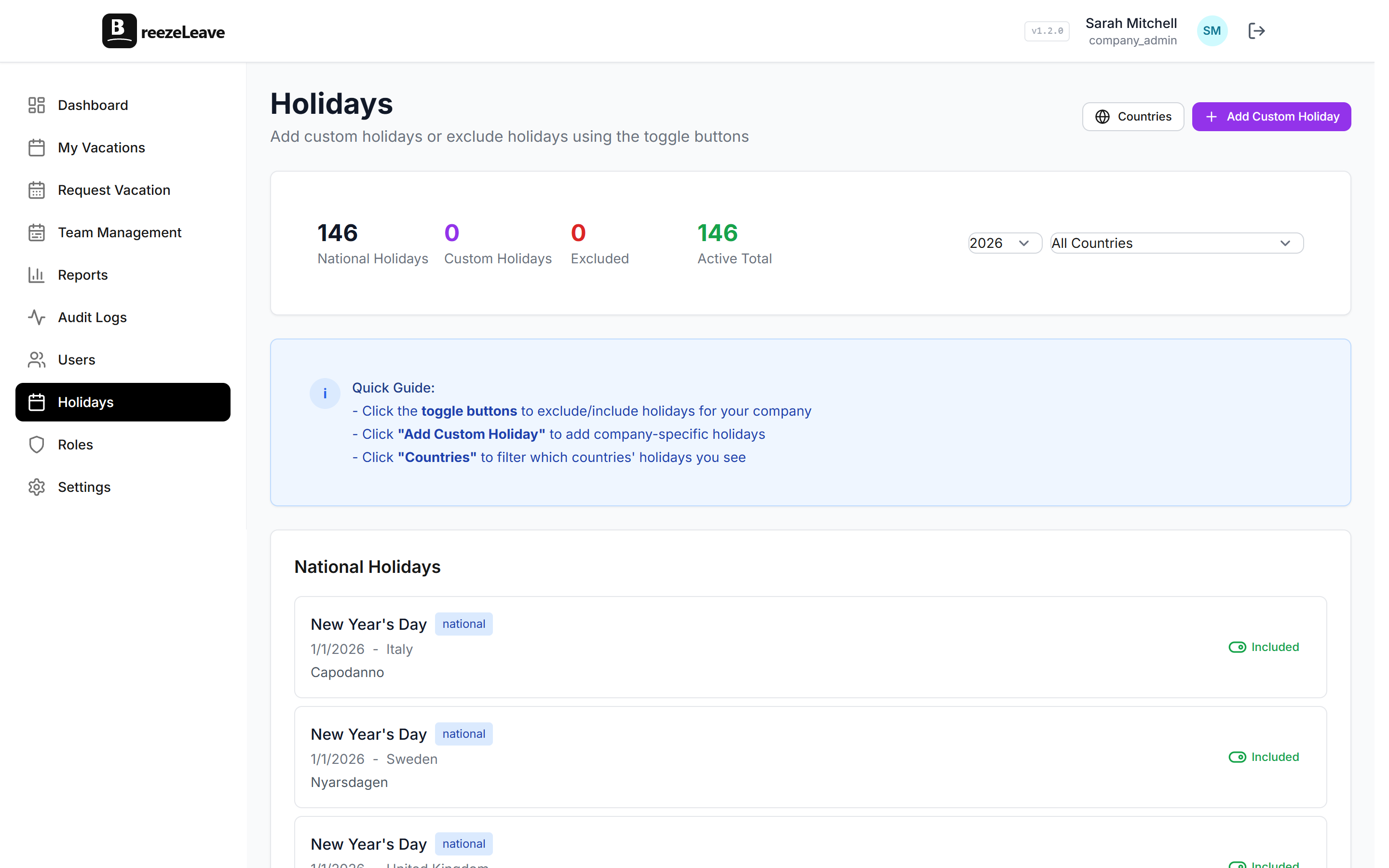
Country profiles for 240+ countries
BreezeLeave ships public holiday data for every UN member country plus several non-member territories, totaling 240+ country profiles. Each one carries the national public holidays for the current year and the upcoming year. A new hire's country gets assigned at setup, and the profile picks up from there.
What sits inside a country profile:
- National public holidays. Fixed dates (January 1) and moving dates (Easter Monday, Eid). The system computes the moving ones for each year.
- Standard working week. Most countries default to Monday through Friday. The Middle East default sits on Sunday through Thursday. The profile sets the baseline; you can override per company.
- Statutory minimum reference. Annual leave statutory floor for the country, surfaced when you set up vacation policies. The profile does not enforce it; it shows the number so HR can make an informed policy decision.
For deeper coverage of how country and policy interact, the multi-country use case page walks through the per-employee country assignment in detail.
Custom company holidays
The country profile is the floor. Most companies layer their own days on top:
- Year-end closure. A common pattern is closing the office from December 24 to January 2. Mark those as paid company holidays and the working-day calculator removes them from requests that span the window.
- Founder or anniversary day. Some companies grant a paid day for the founding date. Add it once; it applies every year going forward.
- Offsite or all-hands week. Mark the entire week as a non-working block. Employees who want to take vacation around it see the correct deduction.
- Regional or state-level holidays. A Bavaria-only day for the Munich office or a Quebec-only day for the Montreal team. Apply the custom holiday to a specific team rather than the whole company.
- Unplanned national days. A country declares a one-off mourning day. The HR admin adds the day immediately as a custom holiday and updates the country profile when the data sync catches up.
Each custom holiday carries the same metadata as a country holiday: name, date, paid or unpaid, applies-to scope. The working-day calculator does not care which list a day came from.
Excluded holidays per region
Country profiles are the default. The exclusion list handles the cases where the default is wrong for part of your team. Three situations show up most often:
- A contractor in a country that does not observe the day. A US contractor working for a Brazilian company should not get Carnival Monday off the books. The policy applied to that contractor excludes the day.
- A regional holiday that the country profile lists but your team does not observe.Some country profiles include observance days that not every region treats as a day off. The exclusion list lets you opt out for a specific team.
- A holiday that falls on a weekend without an in-lieu day. Some countries shift the day off to the following Monday; others do not. The exclusion handles the cases the country profile gets wrong.
Exclusions live at the policy or team level so the rest of the company keeps the default. The audit log records every exclusion change with the actor and the timestamp.
Setup tip
When you onboard a new country, audit the first three months of public holidays in the country profile against an official source. The profile is accurate for the vast majority of dates, but a regional observance or an unplanned day can sit outside the data set. A 10 minute audit before payroll runs saves an awkward correction later.
Working-day calculation that respects both lists
Working-day calculation is where the holiday data has to be right. A leave request from a Berlin engineer that runs Monday through Friday with a Wednesday public holiday should deduct four days, not five. The same logic applies across country holidays, custom company holidays, weekends, and partial days. BreezeLeave computes this on every request, on every approval, and on every carryover run.
The four inputs the calculator uses:
- Country profile. National public holidays for the employee's country.
- Custom company holidays. Whatever the HR admin added on top.
- Working week pattern. Monday through Friday by default, configurable per country or team.
- Excluded days. Holidays the team or policy opts out of.
The blog covers the calculation logic in more depth across two pieces: the working-day calculation guide and the holiday management deep dive.
Where holidays show up across BreezeLeave
Holiday data is not a single screen. It feeds five places in the product:
- Request form. The balance preview deducts the right number before submission.
- Shared team calendar. Public holidays appear with a country tag so managers can read coverage at a glance.
- Approval queue. The approver sees the deducted-days number on every request, not the raw date count.
- Carryover and accrual runs. Year-end logic respects the working pattern.
- Reports and payroll exports. CSV totals reflect working-day deductions, not raw calendar days.
The calendar layout sits on the employee vacation calendar page if you want to see how holidays render alongside approved leave.
Where BreezeLeave fits for multi-country holiday management
BreezeLeave is built for HR teams running 10 to 500 people across multiple countries. Typical fits:
- Agencies, consultancies, and software teams with hires in three or more countries.
- Companies expanding into a second country and tired of maintaining two leave spreadsheets.
- HR admins who need a single working-day source of truth for payroll exports.
- Operations leads who want country and custom holidays on the same shared calendar.
For the broader leave context, the vacation rules engine page covers per-policy holiday handling, and the holiday calendar management guide and the managing PTO across countries article cover the policy and process side. The pricing page has the current plan tiers.
Frequently asked questions
Everything you might want to know before getting started. Still have questions? Reach out anytime.
BreezeLeave ships public holiday data for 240+ countries. Each employee carries a country, and that country profile drives the holidays counted against their working days. The data set covers national holidays for every UN member country plus several non-member territories.
Yes. On top of the country profile, each company can add custom holidays: closure days between Christmas and New Year, a company offsite week, regional anniversaries, an unexpected national mourning day. Custom holidays sit beside the country list and count toward working-day calculation.
Country profiles cover the national level. State and regional days are handled through the custom holiday list. The HR admin adds the Bavaria-only days for the Munich office or the Quebec-only days for the Montreal team, and the working-day calculator picks them up automatically.
Yes. If your German office observes a holiday that your US contractor does not, the exclusion lives on the policy or team level. The country profile is the default; the team setting can override on a per-day basis.
A request that spans Monday through Friday with a Wednesday public holiday deducts four days, not five. The same logic applies to weekends and custom holidays. The balance preview on the request form shows the deduction before the employee submits, so there is no surprise after approval.
Yes. Public holidays appear on the calendar with a different color and a country tag so the team can read at a glance who is off for what reason. The /employee-vacation-calendar page covers the calendar layout in detail.
BreezeLeave refreshes the country data set on a recurring cadence. If a country declares a new holiday, the next sync picks it up. For urgent cases, an HR admin can add the day as a custom holiday immediately and keep the country list in sync once the update lands.