Holiday Calendar Management Guide for Multi-Country Teams
How HR admins can keep national holidays, custom company days, and excluded holidays in sync so PTO requests across countries calculate the right number of days.
The first sign a multi-country holiday calendar has drifted is not a complaint. It is a payroll spreadsheet where someone in Croatia took five days off the week of Corpus Christi and got charged for all five. The Croatian public holiday was on the books in the national calendar but never made it into the company holiday settings, so the working-day count subtracted nothing. By the time anyone notices, the request has been approved, the calendar has been shared, and a quiet rework starts. An HR admin spends Friday afternoon fixing four balances by hand. That entire afternoon is preventable.
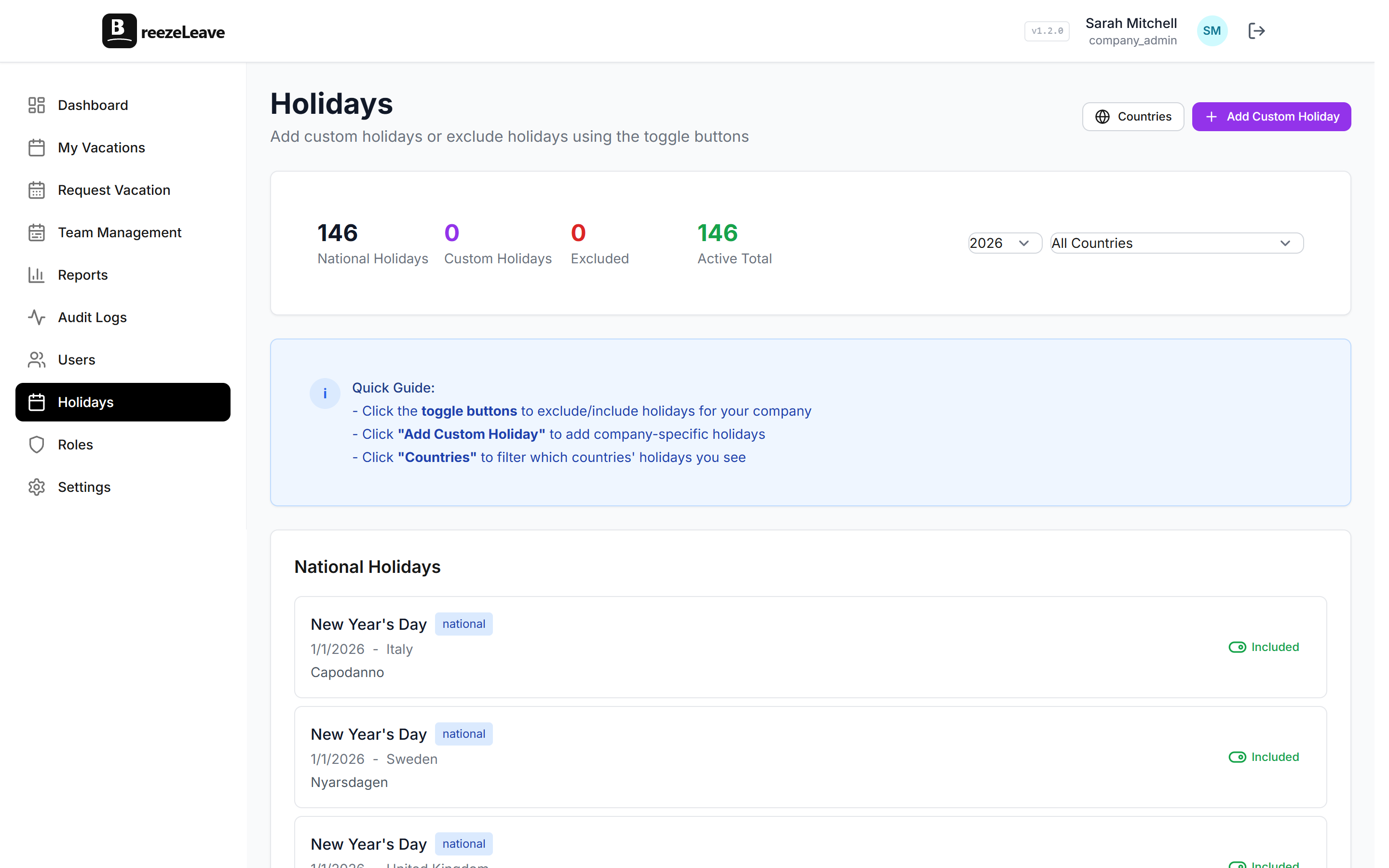
This article is for the HR admin who owns the holiday calendar across more than one country. It walks through how country profiles, custom company holidays, and excluded holidays interact in BreezeLeave, where the working-day calculation usually breaks, and which decisions to make once at the start of the year so the rest of the year runs on autopilot.
Three layers of the holiday calendar
BreezeLeave treats the holiday calendar as three stacked layers. They are not interchangeable. Each one solves a different operational problem.
| Layer | Source | Scope | Who owns it |
|---|---|---|---|
| National holidays | Country profile, auto-populated | All employees in that country | BreezeLeave (with HR review) |
| Custom company holidays | Manually added by HR | Whole company or a country | HR admin |
| Excluded holidays | Marked from the national list | A country or region | HR admin |
The order matters. The national list is the floor. Custom days extend it. Exclusions carve specific days back out when the company chooses not to observe a national holiday. The working-day calculation reads all three when it converts a date range into a charged-day count.
Set country profiles before anything else
The country profile is what tells BreezeLeave which national holidays to apply to which employees. If the profile is missing or pointed at the wrong country, the working-day math has no anchor.
Three checks before you trust the auto-populated list:
- Confirm each employee has the right country assigned. A Serbian employee assigned to a Croatian profile will get Croatian public holidays subtracted from their requests. The error is silent until payroll.
- Review the national list for the year. Country profiles are auto-populated, but regional variants can drift. Walk the list once in January.
- Decide on regional days inside a country. Some countries observe regional days that not every office honors. Use the excluded-holidays layer instead of deleting the national entry.
For the full multi-country picture, the older write-up on managing PTO across countries walks through the day-count differences across Sweden, Croatia, and Serbia in more detail.
Custom company holidays: what belongs and what does not
Custom company holidays are extra company days off that everyone in scope receives. They sit on top of the national list. A few patterns that work:
- The full-company shutdown. Between Christmas and New Year, many teams close. Add the working days in that window as company holidays so requests around the shutdown do not charge those days twice.
- The bridge day. When a public holiday falls on a Tuesday, some companies give the Monday off as a bridge. Add it as a single custom holiday so the calendar is honest.
- The founders day. Anniversaries, summer half-days, or local cultural events that the company observes but the government does not.
What does not belong as a custom holiday: individual employee perks. Birthdays, work anniversaries, and loyalty bonuses are personal grants. Use the rules engine for those, not the holiday calendar. The post on birthday and loyalty bonuses covers the difference.
Excluded holidays: the case nobody documents
Excluded holidays are the layer most HR admins forget exists. They are the way to keep a national holiday on the country profile while telling BreezeLeave that one office, one region, or one company does not actually observe it.
Use exclusions when:
- A regional holiday is on the national list but only applies to a specific area of the country.
- The company operates internationally and a religious holiday in the country profile does not match the office calendar in practice.
- A bank holiday is on the books but the company contracts require working that day, and a separate paid day is granted later.
Excluded holidays preserve the audit trail. The national day is still recorded on the profile, but the working-day calculation skips it for the employees in scope. That is cleaner than deleting the entry, because the next country profile refresh will not re-add it without a paper trail.
How the working-day calculation reads the calendar
When an employee submits a leave request, BreezeLeave converts the date range into charged days by subtracting weekends, country holidays, and custom company holidays for the employee's country, then applying any exclusions on top. Half-days are supported, which matters more than it sounds for teams with regular shorter Fridays.
A worked example helps. An employee in Croatia requests June 18 to June 22, a five-day window. June 19 is Corpus Christi, a Croatian public holiday on the country profile. June 22 is Anti-Fascist Struggle Day, also on the profile. The custom company holiday list has nothing in that window. The system charges three days: the 18th, 20th, and 21st.
If the company has excluded Anti-Fascist Struggle Day for a specific region inside Croatia, the same request from someone in that region charges four days instead. Same country, different scope, different answer. That is exactly why exclusions exist.
The deeper version of this math, including the half-day cases, lives in how working-day PTO calculations should work. Read it once if your payroll team has ever flagged a balance that did not match a request count.
Annual review: a January HR routine
The holiday calendar is not a one-time setup. Two checkpoints keep it honest year over year.
Mid-November:
- Pull the country profile for each operating country and compare it to the official source.
- Confirm the company shutdown window dates for the upcoming year.
- Add bridge days for the upcoming year.
- Re-confirm exclusions still make sense, especially after staff changes.
First working week of January:
- Verify the next year's national entries auto-populated correctly.
- Re-check the country assignment on every employee profile, especially recent hires.
- Spot-check three requests submitted in the first week to confirm the day count is right.
Most of this takes under an hour if the previous year was clean. The hour is cheap compared to a payroll dispute in March.
Common holiday calendar mistakes
Three errors keep coming up in HR support conversations across BreezeLeave teams. Each one has the same root cause: a layer is being used to solve a problem the next layer up was meant for.
| Mistake | Why it happens | Right place to fix |
|---|---|---|
| Deleting a national entry | Office does not observe it | Use excluded holidays |
| Adding a birthday as a company holiday | No one-off way visible | Use the rules engine, not the calendar |
| Mixing countries on a custom day | A shutdown applies only to one office | Scope the custom holiday by country |
| Forgetting bridge days | Decided informally each year | Add as a custom holiday in November |
The pattern: the holiday calendar is a public, shared source of truth. Personal grants and approval rules belong somewhere else.
When the calendar disagrees with payroll
If the holiday calendar and payroll disagree on day counts, the audit log is the starting point. BreezeLeave records every holiday change with a timestamp and the admin who made it. The reconciliation conversation gets a lot shorter when both sides agree on which version of the calendar was active on the day a request was approved.
For the broader audit picture, see why audit logging matters for leave management. Holiday changes are one of the most-edited objects in a calendar year, so the trail is not optional.
Quick reference: the holiday calendar order of operations
- Assign each employee to the right country.
- Confirm the country profile against the official source for the year.
- Add custom company holidays for the year.
- Mark excluded holidays where the company does not observe a national day.
- Spot-check the working-day count on a few real requests.
- Re-run the same checks in mid-November for the upcoming year.
Once these six steps are in place, leave requests across countries land with the right day count without anyone touching them. To start configuring the holiday calendar and working-day rules for your countries, head to holiday management in BreezeLeave.