
Most agency owners check cash on a Friday afternoon. The bank balance looks fine. The pipeline looks fine. Three weeks later, a retainer cancels, a hire starts, and the runway picture changes faster than the spreadsheet can keep up. That gap between operating reality and the cash view is where agencies usually get hurt.
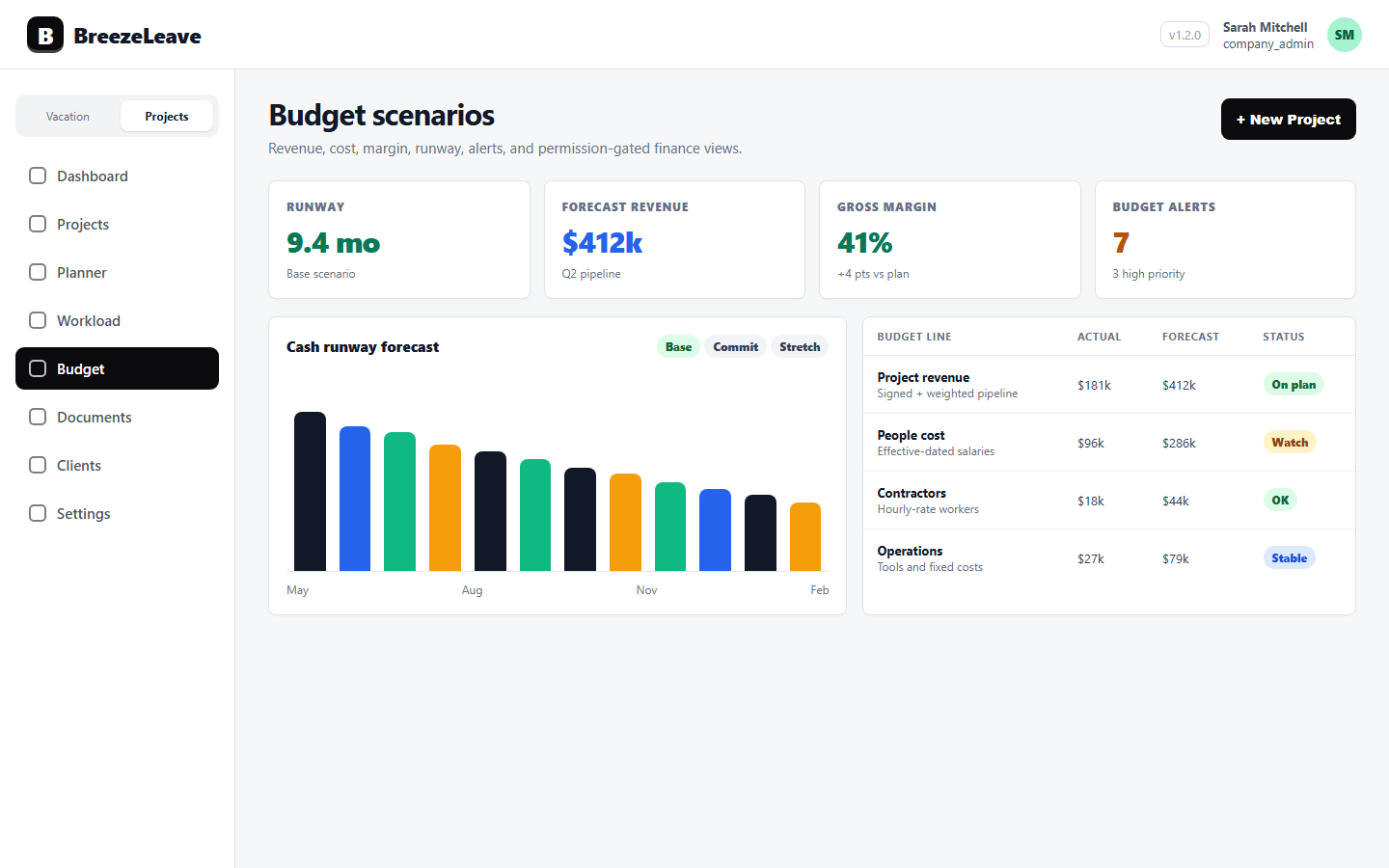
BreezeLeave brings agency cash runway into the same operating view as project budgets, planned headcount, and forecast scenarios. The finance lead sees runway against starting cash, monthly burn, and the hiring plan that is about to change both numbers. The owner sees the same picture before agreeing to a new project or signing an offer letter.
Where agency cash runway usually breaks
Runway forecasting in a spreadsheet starts fine. One sheet for revenue, one for cost, one for cash. Then a quarter goes by and the inputs drift. A retainer expansion gets logged in the wrong month. A new hire is in the org chart but not in the cost model. The runway figure becomes a rough guess instead of a defensible number.
Here are the patterns that show up most:
- Starting cash is fresh, but monthly burn is stale. The bank balance gets updated every Monday, while the burn model still reflects last quarter's headcount.
- Planned hires sit in HR but not in finance. Three offers are out, but the cash plan still assumes the current team size.
- Retainer churn is invisible until invoice month. A retainer that ends in 90 days does not show up in runway until the revenue side catches up.
- Scenario thinking lives in one person's head. Baseline, stretch, and downside versions exist as separate tabs in a workbook, and nobody else can defend the assumptions.
Runway forecasting works when the inputs are visible, named, and connected to the operating plan. That is what BreezeLeave is built around.
What the runway panel actually shows
The cash runway view in BreezeLeave reads four inputs and displays runway in months along with the cash balance trend. Each input is editable and surfaced with the assumption window it was calculated from. There is no hidden formula.
Starting cash on hand
The number you currently have in the bank, set manually or imported from your accounting source. Finance leads usually update this once a month. The runway panel always shows the date the cash balance was last set.
Monthly burn
Net monthly cash outflow, calculated from project cost, salary cost, fixed overhead, and inflows from project revenue and retainers. Burn can be set as a fixed input or read from the trailing three-month average so a one-off month does not skew the picture.
Planned headcount line
Future hires reduce runway from their planned start date. A planned senior developer joining in two months adds salary cost to month three onward, and the runway figure drops by the same amount. The line is visible to anyone with permission to see budget data, so hiring and finance are looking at the same chart. For a deeper look at how planned headcount fits into the broader budget review, see our guide on agency budget reviews with scenarios, runway, and headcount.
Runway alerts
Configurable thresholds flag when runway drops below a chosen number of months. A six-month threshold is common for agencies that want time to react before the cash position gets tight. Alerts surface in the budget view and can prompt a scenario review.
Assumption note
Every runway figure in BreezeLeave shows the inputs it was built from: starting cash date, burn calculation window, planned headcount line, and scenario picked. There is no single number floating without context. If a stakeholder asks why runway changed, the trail is in view.
How runway and budget scenarios connect
Runway and forecasting are related, but they answer different questions. Forecasting asks: what will revenue and cost look like over the next quarter? Runway asks: given that picture, how many months of cash do we have? BreezeLeave keeps both views in the same module so the finance lead does not have to reconcile two spreadsheets.
Each forecast scenario carries its own cost and revenue projection. The runway calculation reads whichever scenario is active. A typical agency review flow looks like this:
- Baseline. Current retainers, current headcount, no new wins. Runway here is your floor.
- Stretch. Add expected wins, a new senior hire, and the retainer expansion that is in negotiation. Runway here shows the path if the plan goes well.
- Downside. Remove the largest retainer, delay the planned hire, and reduce new business by half. Runway here is the picture if a few things go wrong at once.
Comparing the three scenarios side by side is more useful than a single point estimate. A baseline that shows nine months of runway and a downside that shows three months tells the owner where the risk concentration is. For more on how to structure these reviews, our post on project financial forecasting scenarios walks through the cadence and the inputs.
Cash runway vs forecasting: which one to use
Finance leads sometimes treat runway and forecasting as the same exercise. They are not. Here is how the two views differ in practice:
| Question | Cash runway view | Forecast scenarios |
|---|---|---|
| Time horizon | Today forward, in months | Quarterly to annual |
| Key input | Starting cash and net burn | Revenue and cost projections |
| Updated when | Monthly, after bookkeeping close | Per planning cycle or major change |
| Primary audience | Owner, finance lead | Owner, finance lead, department heads |
| Best for | Hiring timing, cash decisions | Sales and delivery planning |
A common pattern is to run the forecast scenarios at the start of each quarter and refresh the runway view every month. The forecast sets the assumptions. The runway view tracks whether reality is keeping up.
A monthly cash review that actually finishes
Cash reviews drag when nobody knows whose number to trust. The following sequence keeps the meeting tight. A finance lead can run through it in under an hour with the BreezeLeave budget view open.
- Refresh starting cash. Update the cash balance from the bank as of the first of the month. Note the date on the panel.
- Confirm burn window. Decide whether to use the trailing three-month average or a fixed input. State the assumption out loud.
- Review planned headcount. Walk through the headcount line. Any new offers out? Any starts being delayed? Update the start dates.
- Compare scenarios. Look at runway under baseline, stretch, and downside. Where is the gap widening? Where is it narrowing?
- Decide one thing. Pick one action: delay a hire, push a sale, raise a retainer rate, reduce a fixed cost. Then close the meeting.
Permission note
Cash runway and aggregate cost data are sensitive. BreezeLeave permission-gates these views so only roles with budget read access can see them. Operational users can plan capacity and delivery without ever seeing the company cash position.
How runway forecasting fits with project budgets
Cash runway is not a standalone number. It moves when project budgets move. A retainer that ends early reduces incoming cash. A project that overruns on cost adds to monthly burn. BreezeLeave connects the project budget view to the runway calculation so finance leads can trace a runway change back to the project that caused it.
This is the value of having project budget tracking in the same module as cash runway. A finance lead reviewing the budget grid can see per-project revenue and cost, then jump to the runway panel and see how that data shapes the cash plan. There is no manual reconciliation between two systems.
For agency-specific operating context, the BreezeLeave for agencies page covers how clients, retainers, project delivery, and cash planning sit together in one operating view.
What this is not
A few honest limits, because finance leads ask:
- BreezeLeave is not your bookkeeping system. The starting cash figure is set manually or imported. The truth still lives in Xero, QuickBooks, or whichever ledger you use.
- The runway number depends on the inputs. If burn is wrong, runway is wrong. The view always shows the assumption window, so the input quality is visible.
- There is no claim about percentage savings or hours saved. The benefit is faster review cycles and a defensible runway number, not a marketing metric.
- Permission gating is real. If a delivery lead does not have budget read access, they cannot see runway, aggregate cost, or planned headcount.
Project Operations add-on
Project Operations is an add-on to BreezeLeave. $8/user/month, or $6/user/month with annual billing (save 25%). 14-day free trial. Add at signup or anytime from billing.
Frequently asked questions
Everything you might want to know before getting started. Still have questions? Reach out anytime.
Runway is calculated from starting cash divided by trailing monthly net burn. The panel reads cash balance, projected monthly outflows, and inflows from project revenue and retainers. The number is only as good as the inputs, so it always shows the assumption window beside the result.
Yes. Each forecast scenario (baseline, stretch, downside) feeds the runway view so a finance lead can compare the cash impact of different revenue, cost, or hiring assumptions in the same place.
Yes. The planned headcount line in the budget views increases monthly cost from the planned start date, which then changes the runway calculation. A future hire is visible against the cash plan before the offer goes out.
Cash and budget views are permission-gated. Finance leads and owners typically see runway, while delivery and operations roles can be limited to project-level views without exposing aggregate company cash.
Yes. Threshold alerts can flag when runway falls below configurable months. Finance reviews can use these alerts to prompt a scenario or hiring review before the number gets worse.
No. BreezeLeave is an operating layer for project, capacity, and budget planning. Accounting truth still lives in your bookkeeping system. Runway and budget views show finance leads how delivery and hiring choices affect cash on hand.
Related resources
- Project budget tracking for connecting per-project revenue, cost, and margin to the company budget view.
- Agency budget reviews: scenarios, runway, and headcount for the operating cadence behind these views.
- Project financial forecasting scenarios for structuring baseline, stretch, and downside scenarios.
- BreezeLeave for agencies for the broader operating picture across clients, retainers, capacity, and cash.
- Pricing for current plan details, including the Project Management add-on that covers budget views.