
A compliance lead at a 220 person engineering company opens her inbox on a Tuesday morning to find three threads: a finance auditor wants the trail behind a manual balance adjustment from October, an employee in the Berlin office disputes that her parental leave was approved on the date her manager claims, and the works council has scheduled a review of leave decisions in Q3. None of these conversations can be settled by memory. They can only be settled by a record that no admin can edit after the fact.
Audit logs for leave management exist for that record. BreezeLeave writes one entry every time somebody acts on a leave request, a balance, a rule, a role, or a permission. The entry is append-only. It captures who did the thing, what the thing was, when it happened, and which object it touched. That is the trust layer underneath every other feature.
What an audit log has to be to count as evidence
Not every change log is an audit log. A list of recent activity in the UI is convenience. Evidence has four properties that convenience does not have to meet:
- Append-only. An admin cannot edit or delete an entry. If you can rewrite the history, the history stops being proof of anything.
- Actor identity. Every entry names the user who took the action, not just the role they hold. "Maria from HR" beats "an HR user" when a dispute is on the table.
- Timestamps in UTC. Working across countries means converting clocks. Recording UTC and displaying local time keeps the trail readable and preserves the source clock.
- Object reference. The entry points to the request, balance, policy, or role it touched, so a reviewer can pull the related record directly.
BreezeLeave meets all four. The audit log is a separate write path from the operational record, so an action on the UI produces both the state change and the audit entry in the same transaction.
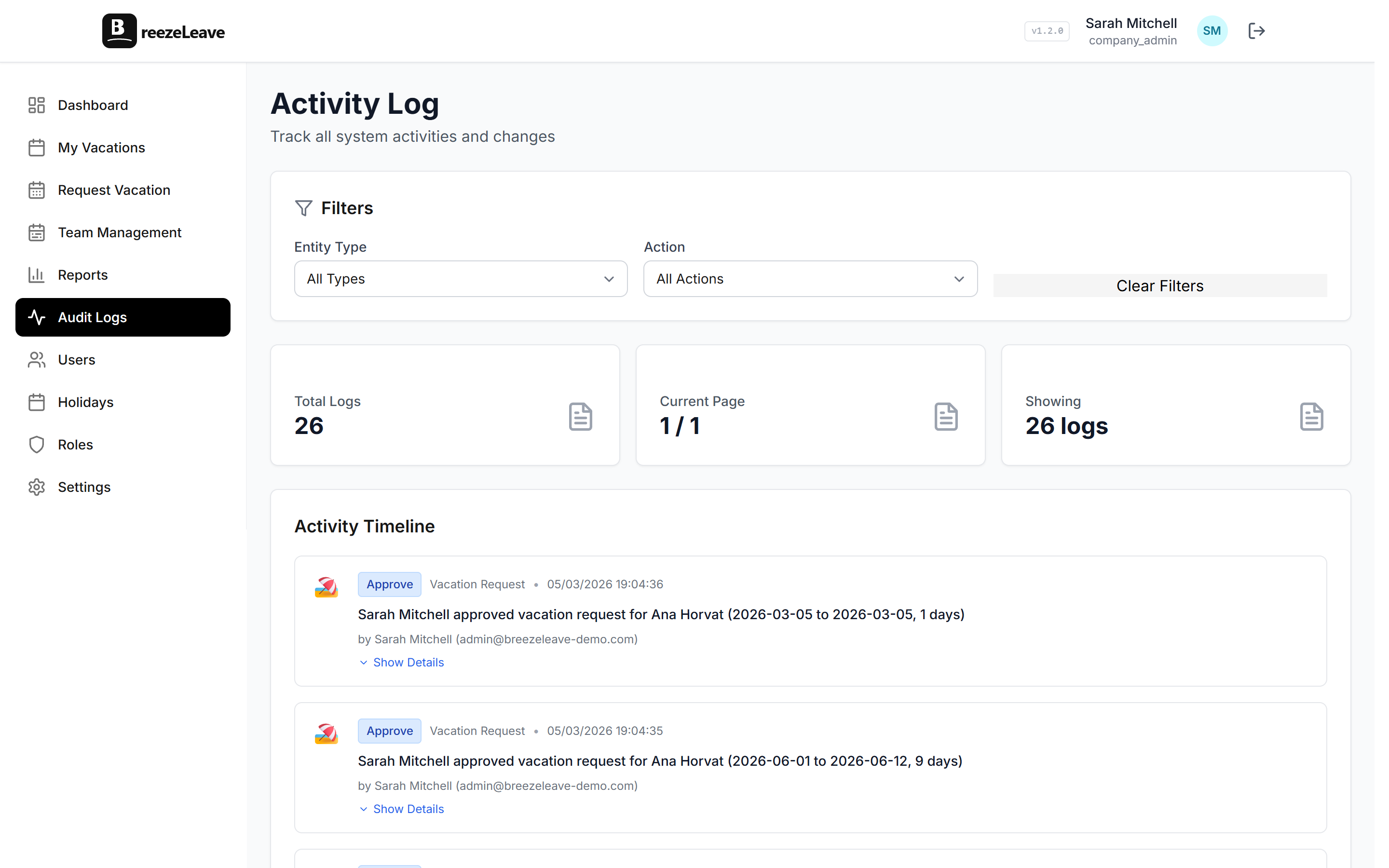
The actions BreezeLeave records
The log covers six categories of events. Each one writes an entry every time, regardless of which UI surface the action came from (web, Slack, Teams, or the API).
Leave requests
Submission, edit, cancel, approve, reject. The entry records the employee, the requested dates, the leave type, and the resulting status. An approval entry names the approver and the approval policy that was applied.
Balance changes
Accrual runs, carryover, manual adjustments, bonus grants, and balance corrections. A balance change entry stores the before and after values so a reviewer can see the delta without recomputing it. Manual adjustments also capture the reason note the admin left at the time.
Rule edits
Any change to vacation rules, approval policies, accrual settings, carryover caps, or blackout dates. A rule edit names the actor, the rule type, and the changed fields. Rolling back a rule also produces an entry so the trail covers reverts, not just changes.
Role changes
User invites, role assignments, role removals, custom role edits, permission-key toggles. These are the entries that matter most to a security review. Who granted finance access to which user, on which day, is one filter away.
Settings updates
Company settings, integration setup, notification toggles, holiday list edits. Any change to the configuration that affects how leave is processed produces an entry.
Authentication events
Login, logout, password reset, two-factor enrollment, session revocation. Authentication entries answer the IT side of a compliance review when a credential is reviewed.
What the log does not capture
Equally important is what the audit log does not store. A few things are out of scope by design:
- Medical notes or sick-day reason text. The body of a doctor's note never lands in the log. The event records that sick leave was approved; the medical detail stays private.
- Read events on regular records. Opening a request page does not write a log entry. Read tracking would flood the log with noise and offer little compliance value.
- Internal system events. Cron job runs, sync jobs, and similar background work are tracked separately in operational logs that admins do not need to review.
- Free-text reasons attached to leave requests. The fact that a leave request was submitted is recorded. The personal narrative the employee included stays on the request, not duplicated into the audit trail.
Treating the log as a record of decisions rather than a record of every keystroke keeps it useful. Reviewers can read it; they do not have to filter through pages of irrelevant entries.
Compliance tip
Before your first audit, agree on three things with your compliance lead: which log fields satisfy your retention policy, who holds read access to the log itself, and the cadence for internal review. The log answers questions, but only if somebody is reading it on a known schedule.
Using the log to settle disputes
The most common reason an HR admin opens the audit log is a dispute. Three patterns show up again and again:
- A balance disagreement. An employee says they had 18 days going into January. The current view shows 14. Filter the log by that employee and the carryover and adjustment entries explain the gap, including the actor who entered each adjustment.
- An approval timing question. A manager claims they approved a request on Monday. The employee saw nothing until Thursday. The approval entry carries the timestamp; the notification log on the request shows when the email actually went out. The two together resolve the disagreement.
- A permission concern. A finance user reports seeing aggregate cost data they did not expect to access. The role-change entries show when their permissions were last edited and who edited them. The conversation moves from speculation to a documented timeline.
For deeper coverage of the balance-dispute case, the audit logs and balance disputes article walks through the filtering and the conversation, end to end. The audit logging deep dive covers the broader principles of what a leave audit trail should record.
Permissions on the log itself
Reading the audit log is, itself, an access decision. BreezeLeave gates the log behind a dedicated permission key so you can grant audit access without granting other admin rights. Common patterns:
- Compliance lead with read-only access. Can filter and export the log but cannot edit any request, balance, or rule. Useful for an internal compliance officer who should not be in the operational chain.
- External auditor with time-limited access. Invite the auditor as a custom role with audit read access only. Revoke when the engagement ends. The invite, role grant, and revoke each produce their own log entries.
- HR scoped to one country. Audit log filtering respects scoping. A regional HR lead can read the log for their country's employees and policies while staying isolated from the aggregate log for other regions.
The full permission matrix lives on the role-based permissions page. The audit log is one of the surfaces those permissions cover.
Export, retention, and review cadence
The log is built for review, not storage as a side effect. Three features support a real review process:
- CSV export with filters. Date range, actor, action type, object type. Finance can pull the changes touching the year-end balance run; security can pull every role change in the last quarter.
- Retention for the life of the account. Paid plans do not auto-purge audit entries. If your internal policy requires longer-term retention than that, schedule the quarterly export and archive it externally.
- Cross-company log on multi-company setups. Agencies running several clients in BreezeLeave can see a per-company log under each company. The multi-company leave management page covers the multi-company structure.
A useful cadence for most HR teams: monthly review of role changes, quarterly export for the finance archive, and on-demand pulls for disputes. Build the cadence into the compliance lead's calendar so the log gets read, not just stored.
Where BreezeLeave fits for audit-driven HR teams
BreezeLeave is leave management, not a general-purpose audit platform. Typical fits for the audit log feature:
- HR teams at regulated organizations (finance, healthcare, government suppliers) that need a documented leave decision trail.
- Enterprise HR teams responding to internal audit reviews and works council inquiries.
- Agencies running leave for multiple client companies, where each client requires its own audit boundary.
- Companies preparing for SOC 2 or ISO 27001 assessments where the leave system has to demonstrate access control and change tracking.
For the broader compliance story across roles and access, the role-based permissions page covers the access side. The pricing page lists which plans include extended audit access and external auditor seats.
Frequently asked questions
Everything you might want to know before getting started. Still have questions? Reach out anytime.
Each entry stores actor (the user who took the action), action (request submitted, request approved, balance adjustment, rule edit, role change, user invited, settings update), timestamp in UTC, and the object the action touched (request ID, employee ID, policy ID). Personal data like medical notes never lands in the log. The log answers who, what, when, and which record, not the private reason behind a sick day.
Audit entries are retained for the lifetime of the company account on the paid plans. There is no auto-purge after 30 or 90 days. A works council asking about an approval decision from two years ago will still get the answer. Export to CSV is available so finance and compliance can keep a separate archive if internal policy requires it.
No. Audit entries are append-only. An admin can read, filter, and export, but the records themselves cannot be edited or removed through the UI. That property is the whole point of an audit log. If someone could rewrite history, the log would not be evidence.
Visibility is permission-gated. Owners and admins see everything by default. Custom roles (such as a compliance lead or an external auditor) can be granted read-only access to the audit log while keeping write access to requests, balances, and settings restricted. The role permission matrix on /role-based-permissions-leave-management controls who can read each log surface.
Yes. The export view takes a date range, an optional actor filter, and an optional action-type filter. The CSV includes one row per entry with actor email, action type, object reference, timestamp, and any structured before/after values for balance changes. A finance lead can run a quarterly export in under a minute.
It supports the request. When an employee asks for the record of changes to their leave history, an admin can filter the log by that employee and produce the list of actions taken on their requests and balances. The log shows actor, action, and timestamp. Combined with the request export, it covers what a typical access request needs.
No. The audit log is one piece of an HR compliance setup. You also need clear policies, documented retention rules, signed-off role assignments, and review cadence. BreezeLeave provides the log and the role controls; the policy and review side stays with your compliance lead. Pair it with the role-based permissions page to round out the picture.