
A 60 person HR admin opens the leave spreadsheet on Monday morning and finds three things wrong: two people booked the same week off, one person's balance shows a negative number, and the new hire from last month is missing entirely. This is the moment most HR teams start looking for leave management software, because the spreadsheet has stopped being a system of record and become a daily firefighting job.
BreezeLeave is built for that exact moment. It handles leave requests, balance deductions, approvals, accruals, carryover, country holidays, and the shared team calendar in one place. The rest of this page covers what it does, where it fits, and what trade-offs to expect when you replace a stack of Sheets with a real leave management system.
Where Sheets-based tracking stops being enough
A vacation sheet handles leave for a five person team. It starts breaking around 15 to 25 people, and it collapses hard once you cross a country border or add a second manager. The usual failure points:
- Balance math drifts. One copy-paste error and a senior engineer thinks they have 12 days left when payroll says 4. Nobody catches it until December.
- Approvals happen in side channels. Slack DMs, hallway nods, an email thread buried in a manager's inbox. There is no single record of who approved what.
- Working days are calculated by hand. Two days off either side of a public holiday should not count the holiday. A Sheets formula does not know that.
- Year-end carryover turns into a project. Someone exports the sheet, counts unused days, applies caps in their head, and pastes the new balances into a fresh tab.
- Nobody trusts the calendar view. A second tab with color-coded rows is not a calendar. Managers stop checking it.
Dedicated leave tracking software removes those failure points by making the balance, the approval, and the calendar the same object. Approve a request and the balance moves, the calendar updates, and the audit log records it. There is no manual reconciliation step because there is no second source of truth.

What BreezeLeave does as a leave management system
BreezeLeave covers the full request-to-record path. Each piece below is a real product area, not a feature bullet on a marketing page.
Requests and balances
Employees pick dates, choose a leave type (vacation, sick, personal, parental, custom), and submit. The balance preview shows the deduction before they hit submit. Working-day calculation respects per-country public holidays plus any custom holidays you add. Half-day requests are supported for medical appointments and short absences.
Approvals that match your org chart
Pick a model per team: single approver, sequential chain (manager then HR), simultaneous voting with a quorum, or role-scoped approvers where the dev lead handles devs and the PM lead handles PMs. Approvers do not have to be team members; a regional HR partner or VP of Engineering can be the second signer on every team in their group. The dedicated multi-approval page goes into the voting policies in detail.
Rules engine for accruals, carryover, and lockouts
The rules engine is where most of the operational pain lives. BreezeLeave handles:
- Accrual schedules. Monthly, bi-weekly, annual, or custom rates per leave type.
- Carryover caps and expiry. Cap at 5 days, expire by March 31, or no carryover at all.
- Seniority tiers. Auto-promote employees to higher annual allowances after a tenure threshold.
- Probation lockouts. Block vacation requests during the first 90 days.
- Blackout dates. Refuse new requests during product launches or peak retail weeks.
- Auto-approval thresholds. Approve short, well-advance-notice requests without sending a notification.
A more detailed walkthrough lives on the vacation rules engine page.
Shared team calendar
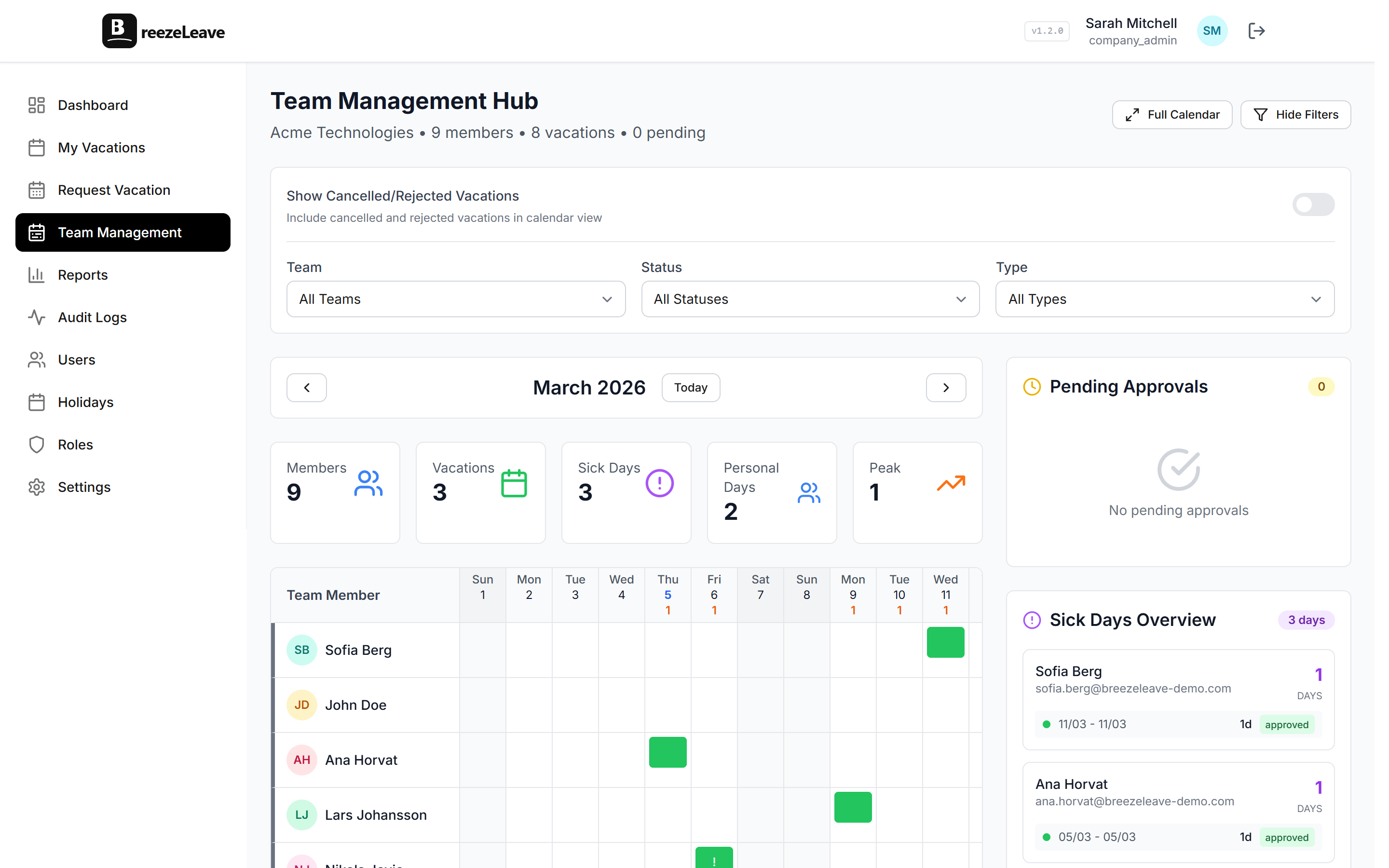
Every approved absence shows on a shared calendar filtered by team, country, leave type, or department. Managers can scan two weeks ahead before approving a new request, which usually prevents the "three engineers off in the same sprint" situation.
Multi-country, multi-company support
Public holiday calendars ship for 240+ countries. Each employee has a country, and their working days and holiday exclusions follow that country. For organizations with multiple legal entities, the multi-company group view lets one admin oversee separate companies while keeping their settings isolated.
Audit logs and permissions
Role-based permissions split admin, manager, and employee access. Every state change is written to the audit log with the actor and timestamp. When an auditor or works council asks who approved a 30 day absence in October, the answer is one filter away.
Pro tip
When you size your rules engine, list the five most common request shapes (regular vacation, sick day, longer absence, last-minute personal day, parental leave) and decide which should auto-approve. Start strict; loosen later. It is easier to relax a rule than to recover from a wrongful auto-approval.
The flows HR admins run every week
Three flows show up on every demo. Here is how each plays out inside BreezeLeave.
A typical request
- An employee opens the app, picks dates, sees the deducted balance, and submits.
- The approver gets a notification in Slack, Teams, or email, with the team calendar inline.
- One click approves or rejects. The balance moves, the calendar updates, the audit log records it.
- The employee gets a notification with the decision and any comment.
Year-end carryover
- The rule runs automatically on December 31 (or your company's policy date).
- Each balance is capped at the configured carryover limit.
- Carryover days expire on the configured date (March 31, June 30, end of year).
- The audit log records every change. Employees see the adjusted balance the next time they log in.
A new hire
- HR creates the user, assigns a country, a team, and a leave policy.
- Probation lockout (if configured) blocks vacation requests for the first 90 days.
- Accruals start running from the start date. The dashboard shows pro-rated balances on day one.
For a complete cutover plan, the leave management software implementation checklist walks through the migration step by step.
Integrations that match where work happens
Leave never happens in isolation. The decisions sit beside Slack threads, Teams channels, calendar invites, and project plans. BreezeLeave plugs into:
- Slack. Request submissions, approval prompts, daily "who is out" digests, and channel routing per team.
- Microsoft Teams. Same set of notifications and approvals, posted to the channels you assign.
- Google Calendar. Approved absences appear on the employee's primary calendar and an optional shared team calendar.
- ClickUp. Surface upcoming absences inside the project tool your delivery team already uses.
- SendGrid and custom SMTP. Branded email notifications using your domain.
- GetAccept. For agencies using GetAccept for client handoffs and approvals.
Each integration is opt-in per company. The full list lives on the integrations page.
Where BreezeLeave fits and where it does not
BreezeLeave is purpose-built for leave. It is not a full HRIS. If you need payroll, benefits administration, performance reviews, and applicant tracking in one product, a suite tool will serve you better. If you want a focused leave management system that integrates with the rest of your HR stack, BreezeLeave is the right shape.
Common fits:
- 10 to 500 person companies leaving Google Sheets or outgrowing a basic vacation tool.
- Multi-country teams that need real per-country holiday handling.
- Agencies and consultancies that pair leave with capacity and project work.
- Operations leads who want audit logs and rule enforcement without buying a full HRIS.
For lighter-weight options, the vacation tracker and PTO tracker pages describe scoped use cases where the rules engine is overkill.
Pricing and getting started
BreezeLeave runs on three plans. Starter is free for small teams. Pro adds the full rules engine, multi-step approvals, and integrations. Enterprise covers multi-company groups, custom SSO, and dedicated support. The pricing page has the current tiers and seat counts.
Setup takes most teams under an hour:
- Create the company, set the working week, and import country holidays.
- Define leave types and accrual rules.
- Import current balances from your existing tracker (CSV).
- Invite employees and assign teams.
- Connect Slack or Teams and test the first request flow.
Once the first approval runs cleanly, the rest of the team usually onboards itself. The request form is short enough that no training session is needed.
Frequently asked questions
Everything you might want to know before getting started. Still have questions? Reach out anytime.
It replaces the spreadsheet, the Slack DMs, and the year-end balance hunt. Employees submit requests, the right approver reviews them, balances deduct on approval, and the shared calendar updates so everyone can see who is off.
A 30 to 80 person team usually finishes in an afternoon. Import current balances, set leave types and accrual rules, invite the team, and connect Slack or Teams. The longest step is deciding how carryover should work.
Yes. You can set per-country leave policies, public holiday calendars, working-day patterns, and accrual schedules. Employees in Germany follow German holidays and statutory minimums; employees in the US follow theirs. The rules engine handles both inside one company.
Yes. You can configure sequential approval chains (manager then HR), simultaneous voting (any one, majority, or all approve), and role-scoped approvers within a single team. See the multi-approval page for the full rule set.
Every request, approval, balance change, and rule edit is logged with the user and timestamp. Admins can filter the audit view by user, date, and event type when an auditor or works council asks for evidence.
Yes. Small teams use the Starter plan at no cost. Pro and Enterprise add advanced rules, custom integrations, and group-level admin. The /pricing page has the current tiers.