
At seven people, the founder approves PTO over DM and somebody updates a Notion page when they remember. At ten, an engineer takes the Friday off and the designer working on the same launch had no idea. At twelve, two people are out for a week and nobody flagged it before sprint planning. That is the moment most startups go looking for an actual leave tracker.
BreezeLeave is built for that exact transition. The Starter plan is free for the first 10 people with the full leave-management feature set, not a stripped trial version. When the team passes 10, Pro is $2 per person per month. Setup is short enough to do between meetings; the daily flow lives inside Slack so nobody has to learn a second app.
The first-HR-process moment
A founder who has done this before knows the pattern. There is a phase between six and fifteen people where a few things break at the same time:
- The PTO sheet is wrong, but nobody admits it.
- The founder is approving every Friday request, which means at least one a week sits unanswered until evening.
- Two engineers go on vacation the same week and the sprint loses a feature.
- A contractor in another country logs unavailability nowhere the team can see.
- The accountant asks for last year's leave by entity and nobody can produce a clean answer.
Each of these has a one-screen fix in BreezeLeave. The balances live in a real ledger with an audit trail. Auto-approval handles the requests that do not need a human. Conflict warnings catch the two-engineers-same-week scenario before approval. Contractors get a unavailability policy with no balance side-effect. Reports export per-company, per-period, for payroll or the board pack.

Slack is where the team already lives
Startup teams run in Slack. Standups, code reviews, deploy pings, the lunch order, the customer escalations. Asking nine people to log into a separate HR portal to request a Tuesday off is how a tool dies in week two.
The full leave flow runs inside Slack. An engineer types a slash command to submit a request. The founder gets a Slack message with approve and decline buttons. Anyone can type /whoisoff and see who is on leave this week. The daily digest posts every morning so the sprint lead does not get surprised at standup. The web dashboard is there for the founder to set policies and pull a report, but daily usage stays inside Slack.
What the Starter plan actually includes
Free for teams up to 10 means the real feature set, not a sample of it. The breakdown:
| Capability | Starter, free for 10 users |
|---|---|
| Balance tracking and accruals | Included |
| Approval flow with conflict warnings | Included |
| Slack and Microsoft Teams integration | Included |
| Team calendar and per-country holiday calendar | Included |
| Audit log and per-period exports | Included |
| Multiple leave types: PTO, sick, parental, custom | Included |
| Auto-approval rules | Included |
There is no credit card on the Starter plan and no expiration timer. Plenty of early-stage startups stay on the free plan for a year before they cross 10 people. The full plan comparison sits on the pricing page.
A founder, 12 people, and an afternoon
Consider a Series A founder who finally accepts the Notion sheet is not a process. They sign up in the morning, get the team onboarded by lunch, and have the first daily digest posting to Slack the next day. Here is the sequence in practice:
- Sign up at breezeleave.com. Create the company. Pick the country and the local holiday calendar.
- Connect Slack. Authorize the workspace, pick a channel for approvals, pick a channel for daily away digests.
- Invite the team via email or by paste-importing a list. They get a Slack DM with the activation link.
- Set the default PTO entitlement, the accrual rule, and the carry-over policy.
- Optional: turn on auto-approval for single-day requests with no team conflict, so the founder is not approving Friday-off requests by hand.
- Optional: import any current balance state from the old sheet so nobody loses days.
The total time depends on whether the founder pauses to read the policy options. Most teams of ten or fewer finish in under twenty minutes. There is more detail in the write-up on a startup's first HR process: leave management.
What an early-stage HR setup needs to handle
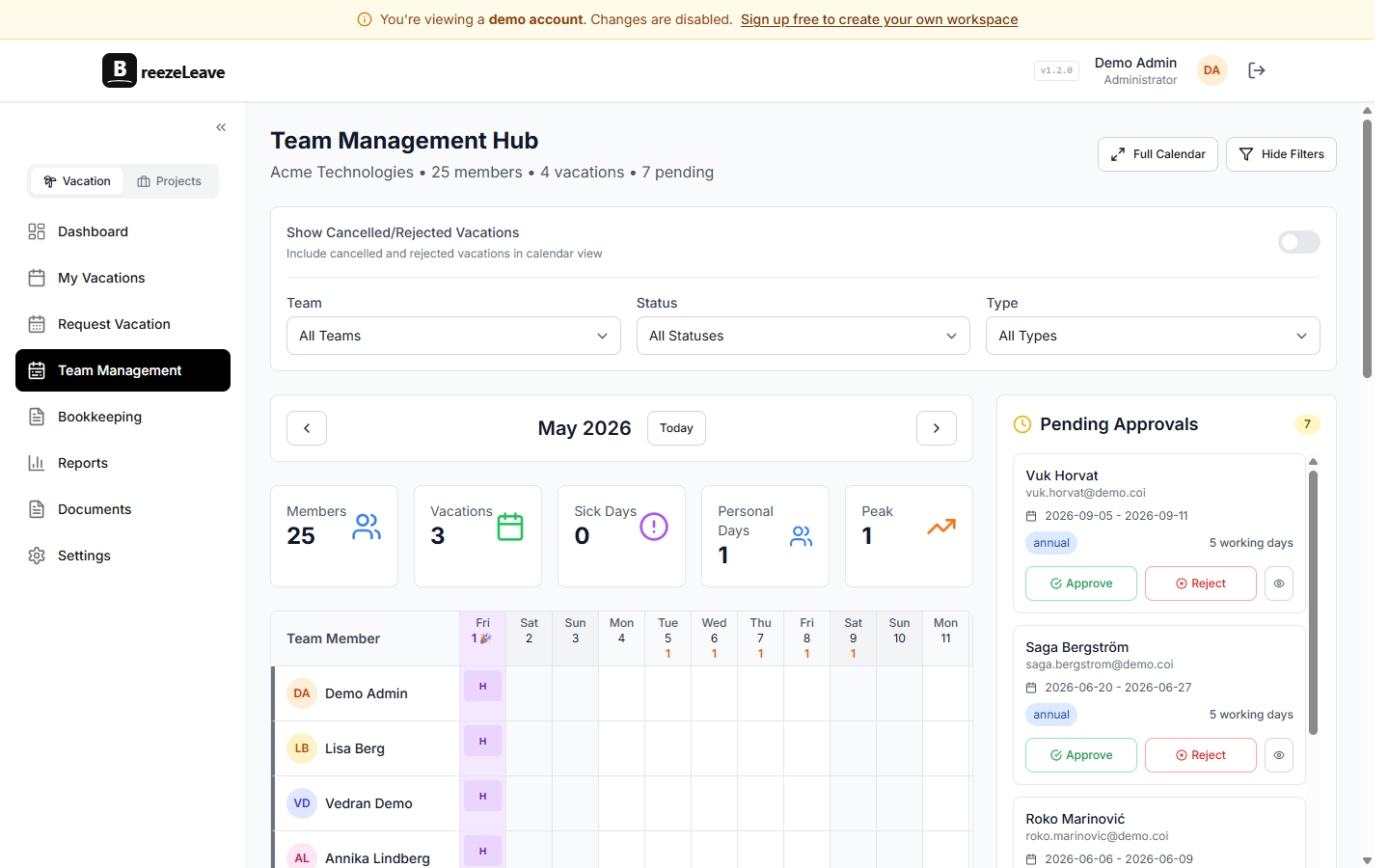
A founder picking the first leave tool is usually thinking about five things at once. They want something that does not need IT to maintain. They want the team to use it the first week, not abandon it after a Slack reminder. They want clean numbers when the bookkeeper asks for last quarter. They want it to grow when the company doubles. They want the price to make sense at 10 people and at 100.
BreezeLeave answers each of these directly. There is no IT step because there is nothing to install: the platform is hosted, the integration is OAuth, and the team gets a Slack DM with their activation link. Adoption tends to be high because every action a team member needs (request, approve, check who is out) is a single Slack command they were going to type anyway. The bookkeeping export produces the per-period, per-person leave report most accountants ask for. The same account scales without a migration. And the Pro price is $2 per person per month, which clears the "is this worth the budget review" bar at any team size.
Where startups want auto-approval, and where they do not
At a 10-person startup, the founder approving every PTO request becomes a bottleneck inside two months. Auto-approval is the fix, but it has to be set up deliberately. The pattern that works:
- Single-day requests with no team conflict: auto-approve. The founder does not need to look at someone taking a Friday off.
- Requests submitted more than two weeks in advance: auto-approve.
- Requests that would leave the team below the minimum on-call or coverage level: hold for manual review.
- Requests overlapping with another team member on the same project: hold for manual review.
- Anything five days or longer: manual review, always.
These rules can change as the team grows. At 30 people the founder is no longer the approver, the engineering manager is. At 60 people there are multiple approval chains and the conflict thresholds are higher around launches.
What scales when you do
The reason to set BreezeLeave up at 10 people is that nothing changes when you hit 30, 60, or 200. The same account adds:
- Departments and teams, each with their own approver and policy.
- Country-specific holiday calendars for each new office or remote hire.
- Role-based access so a department head sees their team and not the whole company.
- Custom leave types: parental, study leave, on-call recovery, jury duty.
- Payroll exports per entity for the new bookkeeper.
- The Project Operations module if the company shifts toward services or delivery work and needs capacity planning, retainer tracking, or ClickUp time logs.
For most software startups the leave-management module is enough. Project Operations is mostly relevant when the team starts billing client work, which is a different stage of company.
Frequently asked questions
Everything you might want to know before getting started. Still have questions? Reach out anytime.
Yes. The Starter plan is free for teams up to 10 people with the full leave-management feature set: balances, approvals, team calendar, Slack integration, audit log, and reports. No credit card, no trial timer. When the team grows past 10, the account moves to Pro at $2 per person per month.
About 10 to 15 minutes for a small team. Create the account, connect Slack, invite the team, pick the country holiday calendar, set the default PTO entitlement. The conflict checker and auto-approval rules can wait until the second week.
The sheet works fine at 5 or 6 people. Around 9 or 10, balances start drifting, two people book the same week, and nobody trusts the numbers anymore. Setting up a proper tracker before that point is faster than untangling the sheet later.
The full request, approval, and away-check flow runs inside Slack. Type a slash command to request time off, approve from a Slack message, run /whoisoff to see who is out. The web dashboard is for reports and policy changes, not for daily use.
Yes. The same account adds departments, custom approval chains, country-specific holiday calendars, role-based access, payroll exports, and the Project Operations module if delivery work comes into the picture. There is no migration to a different product.
Add a second policy for contractors that blocks time without affecting a PTO balance. Set the contractor up against the holiday calendar of their country. The team calendar shows their unavailability the same way it shows a full-timer's PTO.
Where to read next
- Vacation rules engine: how accruals, carry-over, and auto-approval rules are configured.
- A startup's first HR process: leave management: the operational rhythm from 5 people to 50.
- All industries: how BreezeLeave is set up for agencies, consulting firms, tech, nonprofits, and law firms.
- Pricing: free for teams up to 10, Pro at $2 per person per month.
If a Friday afternoon's worth of decisions is the budget, picking the country calendar and turning on auto-approval for single-day requests will get the biggest return.