
The First HR Process Startups Should Automate
A founder guide to making leave management the first HR process you automate at a startup: balances, approvals, the shared calendar, and what to delay until later.
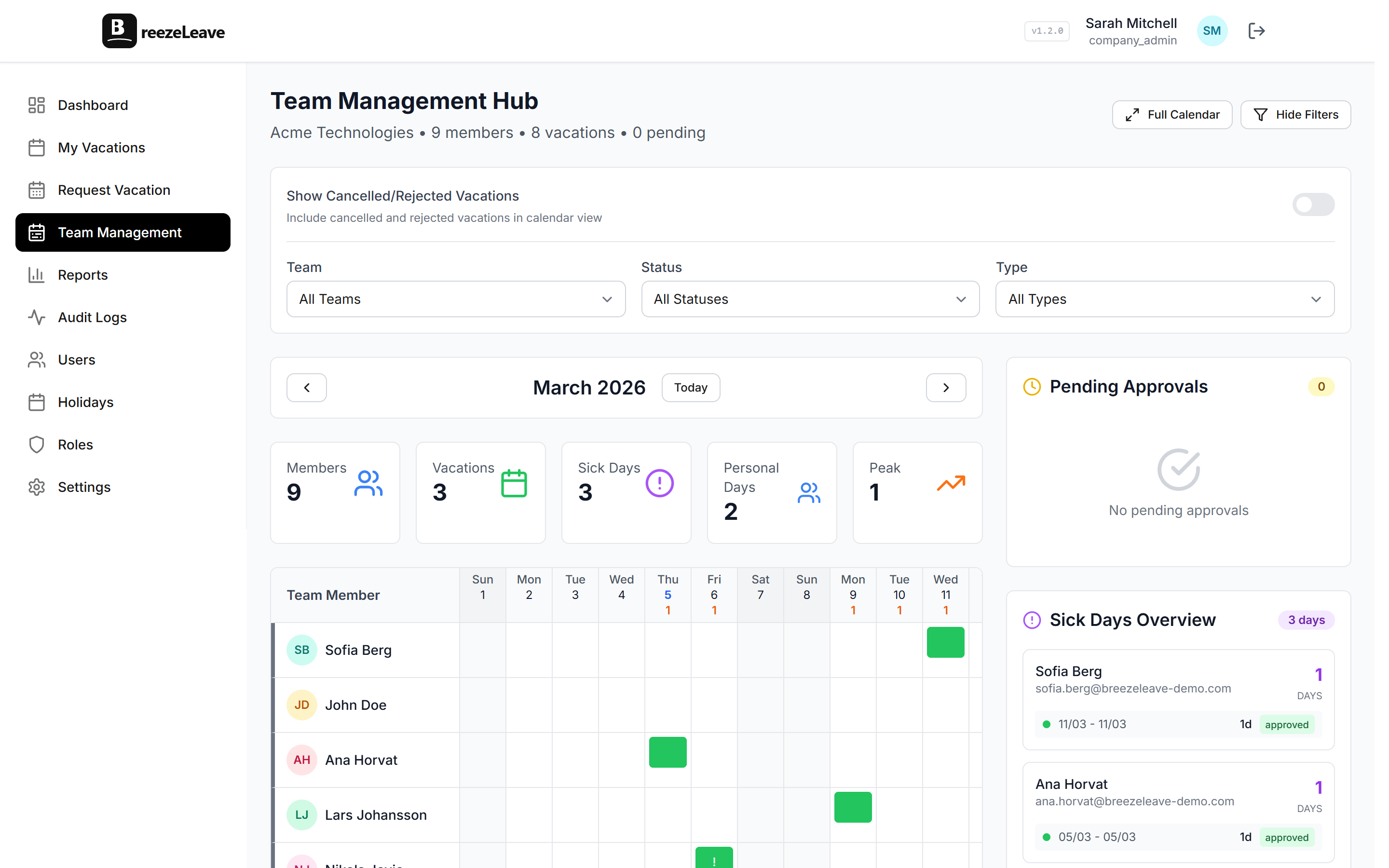
The first HR question at a startup is almost never an HR question. It is the founder asking the head of engineering whether she has enough runway in October to ship a release, while the head of engineering checks Slack and realizes that two of his four senior engineers are out the same week. Nobody set up a process. Nobody is wrong. There just is not a shared place to see who is off when, and the founder is now in the middle of capacity planning instead of selling.
This article is for the founder of a 5 to 30 person startup deciding which HR process to automate first. The answer is almost always leave management. Not because leave is the biggest cost, but because it is the cheapest thing to fix and it removes a class of recurring interruptions that pull engineering leads, the founder, and the office manager out of work all day. The rest is about doing it before buying a full HR suite that nobody asked for.
Why leave management goes first, not last
Most startup HR debates assume payroll comes first, performance reviews second, and leave tracking gets a shared sheet for as long as possible. The order is almost always wrong. Payroll usually runs on an outsourced platform from day one and does not need internal automation. Performance reviews can wait until you have a real cohort of employees. Leave management is the thing that breaks quietly every week.
Three signs your shared sheet is already failing:
- The founder gets a Slack DM about vacation requests at least once a week.A founder is not the right approver. She is the bottleneck.
- Engineering plans a release sprint and discovers a key engineer is out the same week.The information existed somewhere. It was just not visible when planning happened.
- Someone disputes their balance and the shared sheet has three versions.One in Google Sheets, one in an old email, and one in someone's memory. None agree.
These problems do not get worse linearly. They get worse fast. A team of 10 with one or two requests a month and a spreadsheet is fine. A team of 25 with five or six requests a month, three approvers, and quarterly hiring is a different problem entirely.
What "automated" actually means at startup scale
For a 15-person startup, automation does not mean a six-month HR rollout. It means three specific things being true:
- Every employee has a balance they can check without asking anyone.
- Every request reaches the right approver and updates the balance on approval.
- The team can see who is off this week from one shared calendar.
That is the bar. Anything beyond it (multi-step approvals, blackout dates, custom accrual rules) can wait. Most startups never need them, and the ones that do find out when they hit 50 people, not 15.
Free tier reality
BreezeLeave is free for up to roughly 10 seats. For a startup that is still finding product-market fit, that means the leave tool stays free for the first year of headcount, then costs something only when the team starts to scale. The first HR process you automate is also the one that stays cheapest.
The setup a founder can run in an afternoon
A startup leave setup does not need a project plan. It needs an afternoon and a list of people. The sequence below works for any team between 5 and 30 employees, and the founder or office manager can run it without help.
- Create the company. Pick the operating country. This loads the default holiday list.
- Decide the annual entitlement. Most startups settle on 20 to 25 working days plus public holidays. Write it down and apply it across the team.
- Import the team. Name, work email, country, start date, manager. The manager column is the approver, so it has to be right.
- Set starting balances. For employees who have been on the team a while, agree on a starting balance for the current year. Document the math.
- Connect Slack or Teams. This is what makes it stick. If requests live in chat, the team uses the tool.
- Send the announcement. One short message: where to log in, how to request leave, who approves you, what your starting balance is.
The full implementation pattern for larger rollouts is in the implementation checklist, but a startup of 15 does not need most of it. The checklist exists for the day you hit 40 people in two countries.
Where the founder stops being the approver
At 5 people, the founder approves everything. At 15, the founder should approve very little. The moment a startup hires a head of engineering, a head of sales, or an office manager, the approver should change at the same time. Otherwise the founder becomes the dependency for every leave decision in the company, including decisions that have nothing to do with her.
A simple rule that works at startup scale: each employee's direct manager is the approver. The founder is the approver only for direct reports and for the managers themselves. When the founder is on her own leave, the COO or a co-founder is the backup approver. Configure this once, in the team management screen, and it stops being a question.
Approval chain rule of thumb
At under 30 people, single-approver chains are almost always enough. Adding a second approver slows requests down and creates a false sense of governance. The full pattern is in the multi-step approval workflow piece for the day you need it. You probably do not yet.
The Slack or Teams habit that makes it stick
Tools fail when adoption fails. In a startup, the only message channel the team opens every day is Slack or Microsoft Teams. If leave requests live there, adoption is automatic. If they live in a separate web app, the founder spends the next six months reminding people to log in.
The BreezeLeave Slack integration covers the three things that matter at startup scale:
- Submit a request from a Slack slash command. The employee picks dates, the leave type, and submits. No new app, no new login.
- Approve from the approver's notification. The manager taps approve or deny. The balance updates and the calendar shows the new entry.
- A morning summary in the team channel. Who is off today, who is back, what is coming up. The information that used to live in someone's head now lives in the channel everyone already reads.
The detail of the Slack setup is on the Slack vacation bot page and the connection takes about five minutes for someone with workspace admin rights. Microsoft Teams works the same way.
What to delay until later
A startup leave setup gets simpler when you accept what does not need to be in the first month. The list of "not yet" is as important as the list of "now":
| Feature | When you need it | Why not now |
|---|---|---|
| Multi-step approvals | ~50+ people or regulated industries | Slows requests, adds little governance at startup scale |
| Seniority accruals | When tenure crosses 3 years across the team | Nobody at a 2-year-old startup has 3 years of tenure |
| Blackout dates | When a launch or close window is sacred | Startups change priorities too fast for fixed blackouts |
| External HR users | Second country with a local office manager | One country, one founder. Not needed yet |
| Payroll exports | When finance asks for them, usually quarterly | Most startup payroll handles balances inside its own platform |
Skipping these is not a compromise. It is the right call. A startup that buys a full HR suite at 15 people spends six months configuring features it does not need and another six months explaining the cost to the next round of investors.
What changes when the second country joins
The first real complication is the first international hire. A US startup hires in Portugal. A UK startup hires in Croatia. A Swedish startup hires in Serbia. Suddenly you have two holiday calendars, two statutory minimums, and two currencies for the exit payout. The good news is that the tool already supports this. The change is in the data, not the platform.
Add the second operating country in settings, set the default entitlement for that country, and assign the new hires to it. The managing PTO across countries piece covers what to watch out for the first time you do this, including the differences in carryover rules and exit payouts between common pairs of countries.
The first HR signal that matters: the calendar
Once the tool is live, the calendar is the screen that proves automation worked. The founder, the heads, and the team open it for different reasons but they all see the same data. The founder uses it to know when she can schedule a board prep. The head of engineering uses it to plan a release. An employee uses it to ask whether next Tuesday is a good day to take off and still leave the team covered.
That single calendar is the difference between leave being an HR process and leave being a planning input. Once it exists, every other capacity question gets cheaper, and the founder stops being the person Slack-DMed every time a request is in the air.
The short list
A startup has automated leave management the day all of the following are true:
- Every employee has a correct balance visible without asking.
- Each employee's manager is the approver, with a backup configured.
- Requests come in through Slack or Teams, not founder DMs.
- The shared calendar is what the team checks before scheduling anything.
- The founder has not been asked to approve a leave request from outside her direct reports for two weeks.
The fifth point is the one that surprises founders. Once the tool works, the question disappears entirely, and the founder gets back the hour or two a week that used to vanish into approver pings. To set it up, start free with BreezeLeave on the free tier and configure the team in an afternoon.

