
Vacation Balance Automation: Why You Should Stop Counting Days by Hand
Stop counting days by hand. Vacation balance automation handles entitlements, deductions, carryover, and real-time dashboards for you.
I used to spend the last Friday of every month reconciling vacation balances in a spreadsheet that had grown into something between a science experiment and a cry for help. Fourteen tabs. Color-coded conditional formatting that nobody remembered setting up. A VLOOKUP chain so fragile that sorting column B would break the entire sheet for a week.
If that sounds familiar, this article is for you. We are going to talk about vacation balance automation, what it actually means in practice, how it handles the messy real-world scenarios that break spreadsheets, and why it removes an entire category of recurring headaches from your operations.
The Real Problem with Manual Employee Leave Balance Tracking
On paper, tracking vacation balances is simple arithmetic. Everyone gets 20 days. They use some. You subtract. What is left is their balance. A child could do it.
Except reality looks nothing like that.
Common scenario
An employee starts mid-year with a pro-rated entitlement. Another carried over 3 days from last year. A third just came back from parental leave. A fourth works a 4-day week and their entitlement is calculated differently. Good luck tracking that in a spreadsheet formula. And good luck explaining the discrepancy three months later when somebody insists they have more days than your sheet says.
How Errors Pile Up
The real failure mode is not one dramatic mistake. It is dozens of small ones that pile up silently:
- A manager approves a request on Monday
- The person who updates the spreadsheet is on vacation themselves
- By Wednesday, two more requests come through
- Nobody remembers to subtract the first one
Now your balances are off by a day for one employee. You will not discover it until December when they try to take time off and the numbers do not add up.
Manual tracking does not just waste time. It erodes trust. When employees cannot rely on their own balance being correct, they stop trusting the system and start emailing HR to confirm every single request.
If your team is growing beyond a handful of people, this problem only gets worse.
How Vacation Balance Automation Actually Works
The idea behind automatic vacation balance tracking is straightforward: you define the rules once, and the system applies them to every employee, every day, without anyone touching a spreadsheet. So what does that look like in practice?
Step 1: Set Up Entitlements Per Employee
You start by defining your company's leave policies:
- 25 vacation days per year
- 10 sick days
- 3 personal days
Each leave type gets its own entitlement, its own accrual method, and its own rules. Then you assign those policies to employees. Most people get the standard entitlement, but you can adjust for individual cases:
- A senior hire who negotiated 28 days
- Someone on a part-time contract who gets a proportional amount
The point is that each employee's entitlement is stored in the system and calculated from there. Nobody is hand-entering it into a cell every January.
Step 2: Automatic Deduction on Approval
This is the part that eliminates the most manual work. When a vacation request gets approved, the system immediately deducts those days from the employee's balance. No one needs to open a spreadsheet. No one needs to remember. It just happens.
And it counts correctly:
- A request from Thursday to Tuesday? The system knows weekends are not working days. It deducts 3 days, not 5.
- A request that overlaps with a public holiday? It skips that day too.
These are the kinds of miscounts that happen constantly with manual tracking and take forever to untangle.
Example calculation
Employee requests time off from Thursday, April 16 to Wednesday, April 22:
- Thursday April 16: working day, counted
- Friday April 17: working day, counted
- Saturday April 18: weekend, skipped
- Sunday April 19: weekend, skipped
- Monday April 20: public holiday, skipped
- Tuesday April 21: working day, counted
- Wednesday April 22: working day, counted
Balance deducted: 4 days (not 7, not 5)
If you are also interested in how to auto-approve certain vacation requests, that pairs well with balance automation since approvals trigger the deductions automatically.
Pro-Rated Balances for Mid-Year Starts
This is the scenario that produces the most wrong numbers in manual systems. Someone joins on September 1st. The company policy is 24 vacation days per year. How many days do they get?
How Automation Handles It
With a PTO balance calculator built into your leave system, the answer is automatic. The system sees the start date, calculates the fraction of the year remaining (in this case, 4 out of 12 months, or about 33%) and grants 8 days. No manual entry. No risk of accidentally giving them the full 24 and discovering the mistake in March.
What Typically Happens in Spreadsheets
The new hire gets added with 24 days because the person updating the sheet copied a row from somebody else and forgot to adjust. Nobody catches it. The employee takes 12 days by December. That looks normal against a 24-day balance but is actually 4 more than they were entitled to. Now you have a conversation nobody wants to have.
Pro-ration also matters for employees who leave mid-year. Did they take more days than they had accrued by their departure date? The system knows the answer instantly. In a spreadsheet, someone has to sit down and work it out, and hope they use the right formula.
Carryover Rules and Vacation Accrual Automation
Year-end is when manual balance tracking becomes genuinely painful. Every employee's unused days need to be evaluated against the carryover policy:
- Can they carry over 5 days?
- Is there a cap?
- Do carried-over days expire by March, or do they last all year?
Configure Once, Run Automatically
With vacation accrual automation, you configure these rules once. The system handles the rollover on January 1st (or whatever your fiscal year boundary is):
- Employee with 3 unused days and a 5-day cap wakes up on January 2nd with their new entitlement plus 3 carried-over days
- Employee with 8 unused days and the same cap gets their new entitlement plus 5 (excess forfeited)
No spreadsheet surgery required.
How BreezeLeave Handles Carryover
In BreezeLeave, carryover rules are configured per leave type:
- Vacation days might allow a 5-day carryover
- Sick leave might reset completely
- Personal days might have no carryover at all
Each policy runs independently, so year-end does not require a manual review of every employee's row.
Real-Time Dashboard Visibility for Leave Balance Management
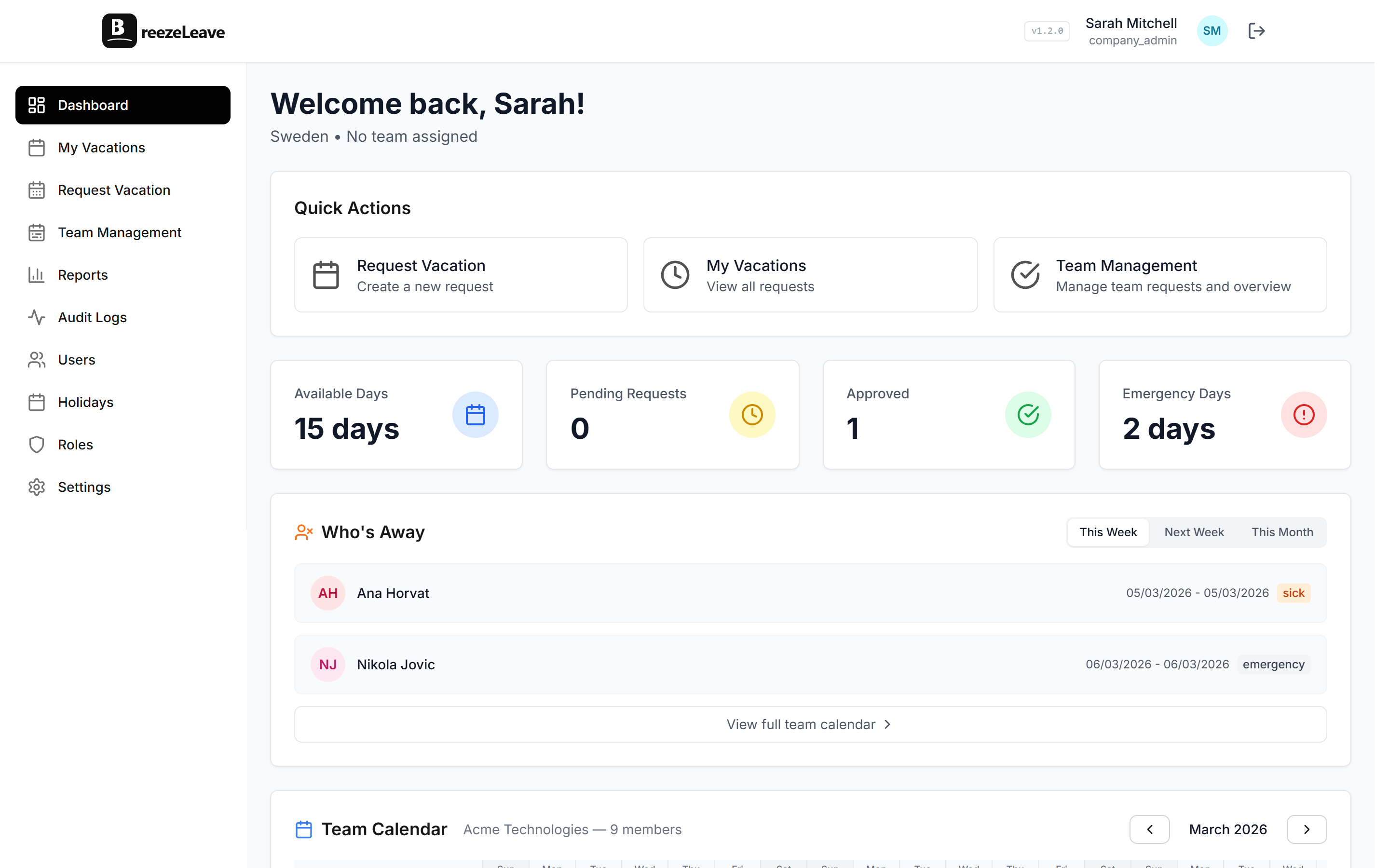
Something you do not get with a spreadsheet, no matter how well-maintained: a live, accurate answer to "how many days do I have left?" that employees and managers can check themselves without emailing anyone.
Four Numbers That Matter
A proper leave balance management dashboard shows four numbers per employee, per leave type:
| Metric | What It Shows |
|---|---|
| Total entitlement | What they are entitled to this year, including any carryover |
| Used | Approved leave that has already been taken |
| Pending | Requests submitted but not yet approved, or approved but not yet taken |
| Available | Entitlement minus used minus pending |
That "available" number is what matters for decision-making. When an employee is planning a two-week trip in August, they can check their balance and know instantly whether they have the days. When a manager is reviewing a request, they see the same number. No guessing, no "let me check with HR," no waiting for someone to open a file.
And when HR needs to run a report for finance on outstanding leave liabilities? The data is already there, accurate to the minute, exportable without a multi-day reconciliation effort.
Before and After: Manual vs. Automatic Vacation Balance Tracking
| Scenario | Manual Tracking | Automated Tracking |
|---|---|---|
| After approval | Someone updates a spreadsheet (if they remember) | Balances update the moment a request is approved |
| Mid-year hires | Wrong balances until someone catches the error | Pro-rated from start date automatically |
| Year-end carryover | Full day of spreadsheet work | Runs on schedule, no manual intervention |
| Checking balance | Email HR, wait for a reply | Self-service real-time dashboard |
| Finance reports | Days of reconciliation | Accurate export in seconds |
| Weekend/holiday counting | Miscounts happen regularly | Handles weekends and holidays correctly |
| Disputes | Hours digging through emails | Full audit trail resolves in minutes |
Separate Balances Per Leave Type
One more thing that spreadsheets handle poorly: tracking different leave types with different rules.
- Vacation days accrue differently from sick leave
- Emergency leave has a fixed cap
- Personal days might reset on January 1st regardless of hire date
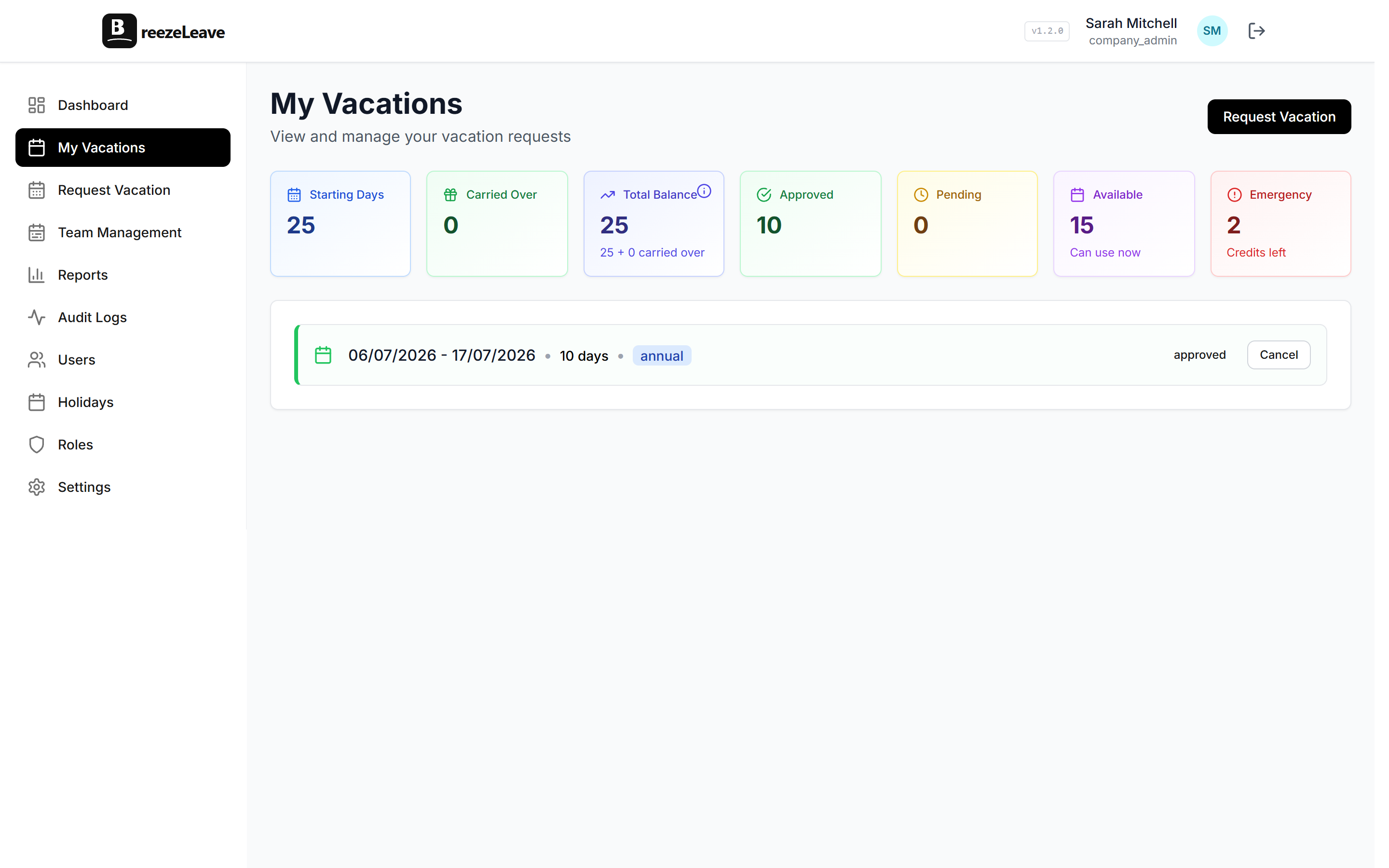
When you collapse all of these into one "days off" column for simplicity (and every spreadsheet eventually does this) you lose the ability to enforce per-type policies or report on usage patterns. An automated system keeps each employee leave balance separate by type, each with its own entitlement, accrual method, and carryover behavior. This matters even more when you are managing PTO across different countries, where leave types and legal minimums vary significantly.
How BreezeLeave Handles Per-Type Balances
In BreezeLeave, you configure leave types at the company level and they apply to everyone. If someone needs an exception (say, an extra 2 vacation days negotiated during hiring) you adjust their individual entitlement without touching anyone else's setup.
What Changes When You Automate
Confidence Comes First
The first thing that changes is not efficiency. It is confidence. When balances are calculated by the system based on defined rules, the number is either right or the rule is wrong. There is no ambiguity about whether someone forgot to update a cell. Disputes drop to near zero because the audit trail shows exactly what happened: this request was approved on this date, these days were deducted, here is the remaining balance.
HR Gets Time Back
The second thing that changes is how much time HR gets back. It is not just the time spent updating the spreadsheet (that is maybe an hour a week). It is the interruptions:
- The "can you check my balance?" emails
- The "I think there is an error" tickets
- The December scramble to process carryovers before the new year
All of that goes away.
You will probably keep the old spreadsheet around for a month or two, just in case. And then one day you will notice it has not been opened since October, and nothing broke. That is the moment it clicks.
If you are still tracking leave balances by hand and want to see what vacation balance automation looks like for your team's size and policy setup, BreezeLeave handles all of this: entitlements, deductions, carryover, pro-ration, real-time dashboards. See our PTO tracker page for a full overview. The initial setup is gonna take about an afternoon.

