Vacation Carry-Over: Rules, Expiry Dates, and How to Automate It
Unused vacation days don't have to disappear on December 31st. Here's how carry-over rules, expiry dates, and caps work in practice.

Every January, the same question floods HR inboxes: "What happened to my leftover vacation days?" Some companies let them roll over. Some cap it. Some let them expire. And a surprising number haven't actually decided, which means HR is making it up case by case.
Vacation carry-over policies exist to solve this. They define what happens to unused PTO at the end of the year. Get it right, and employees feel treated fairly. Get it wrong (or don't have one at all), and you're dealing with disputes, hoarding, and last-minute December rushes.
The three common carry-over models
Most companies fall into one of three patterns:
- Use it or lose it. Unused days expire on December 31st. Simple, but often illegal in EU countries where statutory vacation days must be protected.
- Unlimited carry-over. Everything rolls over indefinitely. Sounds generous, but creates a ticking time bomb of accumulated leave liability on your balance sheet.
- Capped carry-over with expiry. Employees can carry over up to X days, and those carried days expire by a specific date (often March 31st or June 30th). This is the most common middle ground.
The third option is what most companies land on, and it's what BreezeLeave is designed to handle out of the box.
How carry-over works in BreezeLeave
BreezeLeave's carry-over system has three configurable settings per company:
| Setting | What It Does | Example |
|---|---|---|
| Carry-over enabled | Toggles whether unused days roll over at all | On / Off |
| Maximum carry-over days | Caps how many days can be carried into the new year | 5 days |
| Expiry date | Date by which carried-over days must be used or they expire | March 31st |
When a new year starts, the system automatically calculates how many unused days each employee has, applies the carry-over cap, and adds the carried days to their new balance. If an expiry date is set, those carried days are tracked separately and removed if unused by that date.
Why capped carry-over is the sweet spot
Unlimited carry-over sounds employee-friendly until you realize what it creates:
- Employees who haven't taken a real break in two years because they're "saving days"
- A financial liability that grows every month and shows up on your balance sheet
- Teams where one person has 45 accumulated days and eventually takes a two-month absence
- Exit payouts that shock the finance team when someone with 60 banked days leaves
A cap of 5 to 10 days with a Q1 expiry is the most common setup we see. It gives employees flexibility for the holidays without letting the balance snowball. If someone couldn't use all their days last year, they have a few months of buffer. After that, the days are gone, and the message is clear: take your vacation.
Legal note
In many EU countries, statutory vacation days cannot legally expire without the employer actively encouraging the employee to take them. If your company operates in the EU, consult local employment law before setting a strict "use it or lose it" policy. The carry-over cap applies more safely to supplementary days above the statutory minimum.
Carry-over and seniority accruals
Carry-over rules interact with seniority-based accruals in an important way. Consider this scenario:
Maria has been with the company for 6 years and earns 25 vacation days per year. She used 20 days last year. With a carry-over cap of 5, she starts the new year with 25 + 5 = 30 days. Those 5 carried days expire on March 31st.
BreezeLeave handles this automatically. The seniority rules determine the base allocation. The carry-over rules handle the rollover. The two systems work together without any manual intervention.
Communicating carry-over to employees
The biggest source of carry-over disputes isn't the policy itself. It's employees not knowing the policy exists until their days are gone. Three things prevent this:
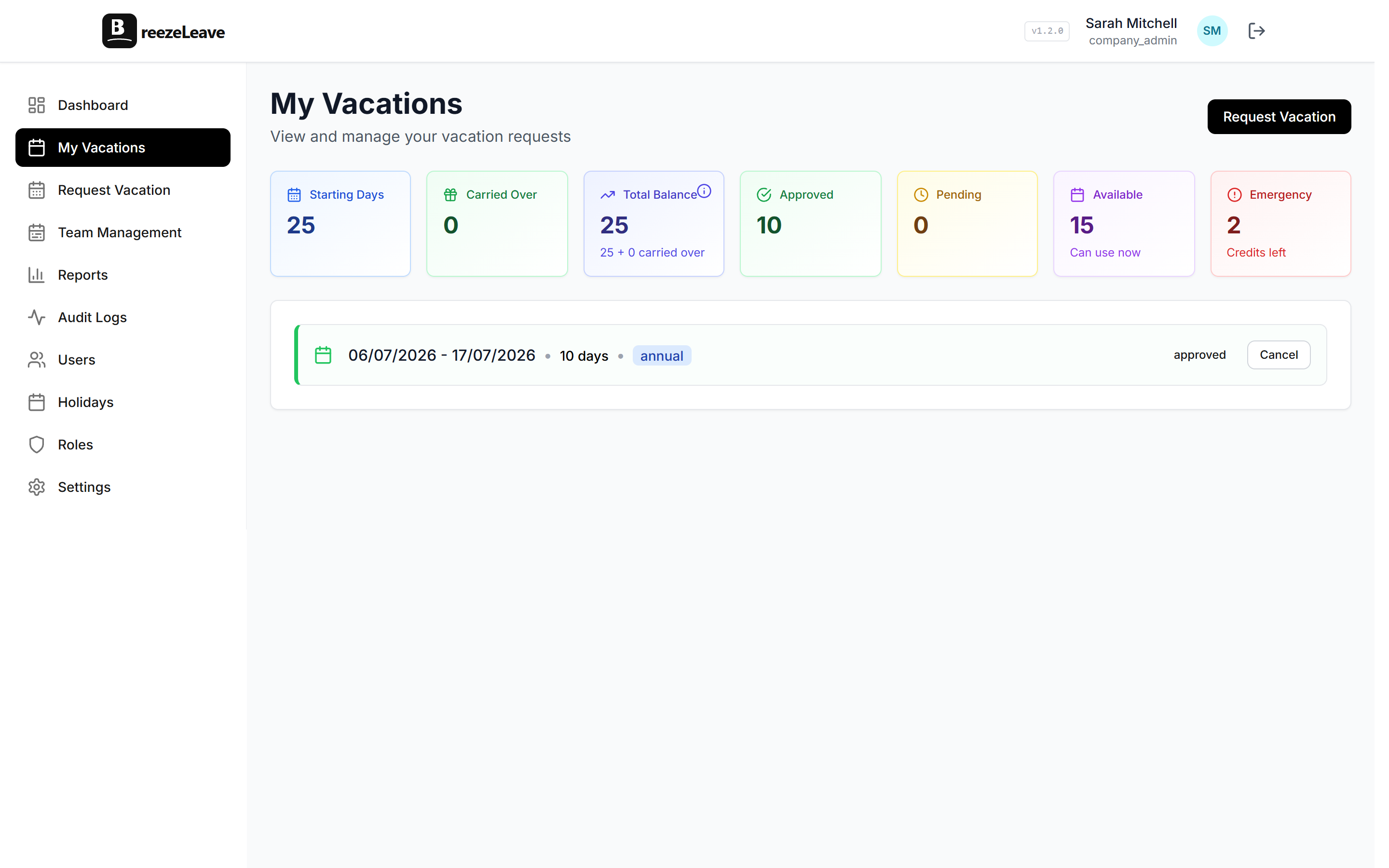
- Make the balance visible. BreezeLeave shows current balance (including carried days) on every employee's dashboard. No need to ask HR.
- Flag the expiry. When carried days are approaching their expiry date, the balance display makes it clear how many days are about to expire.
- Document it once. Put the carry-over rules in your employee handbook and in the leave management tool's settings page where everyone can see them.
If you're using Slack or Teams notifications, a start-of-year reminder about carry-over balances is a good practice. BreezeLeave's notification channels can handle this. See our guide on vacation notifications for setup details.
Setting it up
Carry-over configuration is in Company Settings:
- Enable carry-over
- Set the maximum number of days that can roll over
- Optionally set an expiry date for carried days
- Save
The system applies these rules automatically at year-end. You can also use manual adjustments to handle one-off exceptions (like an employee who was on extended sick leave and couldn't use their days).
Once carry-over is configured, it works year after year without touching it again. Set the policy once, let the system enforce it.