Secure Client Document Sharing Checklist for Agencies
A project-manager checklist for sharing client documents safely: expiry, passwords, view and download tracking, project context, and what to never email as an attachment.
It is 17:40 on a Friday. The senior project manager is about to send a 14-megabyte design system PDF to a client who keeps "losing" the link. Slack pings. The client wants a "quick" copy of the signed statement of work too. And the legal review of the brand guidelines is supposed to arrive tonight. The PM is about to attach all three files to one email, address it to four people on the client side, and hope nobody forwards it to the wider company by mistake. This is how confidential agency documents end up in the wrong hands. Not through a breach. Through a Friday afternoon attachment.
Secure client document sharing is a habit, not a tool. The checklist below is the version a project manager can keep next to the file upload button. It assumes the agency uses BreezeLeave for project documents, but the questions apply to any sharing tool. The point is to never make a sharing decision in 30 seconds when 90 seconds would protect the client and the agency.
The 14-item checklist
Run through the list before generating any public link. Each item has an owner. The PM owns most of them, with the client owner confirming sensitivity and the operations lead confirming retention.
| # | Check | Owner |
|---|---|---|
| 1 | The document is attached to the right project and client record | Project manager |
| 2 | The file content has been reviewed for confidential data | Project manager |
| 3 | The sensitivity label is set: internal, client-only, or public | Client owner |
| 4 | The link has an explicit expiry date | Project manager |
| 5 | The link has a password if it carries commercial or signed content | Project manager |
| 6 | View and download tracking is enabled | Project manager |
| 7 | The recipient list is limited to the people who need the file | Client owner |
| 8 | The password is delivered through a different channel than the link | Project manager |
| 9 | The link is sent from the agency address, not a personal account | Project manager |
| 10 | The document version is the final reviewed version | Project manager |
| 11 | Old links to earlier versions have been revoked | Project manager |
| 12 | The retention rule for this document type has been applied | Operations lead |
| 13 | Departing employees no longer have access to the project documents | Operations lead |
| 14 | The view log is checked at least once before contract close | Client owner |
Fourteen checks sound like a lot. In practice, items 1 through 11 run in under two minutes once they are a habit. Items 12 through 14 are reviewed weekly by the operations lead, not at every share.
Why attachments are the wrong default
Email attachments lose control of the document the moment they leave the outbox. There is no expiry, no password, no view log, no way to revoke. A signed statement of work attached to an email can be forwarded to a competitor by an intern with screen-recording software, and the agency will never know it happened.
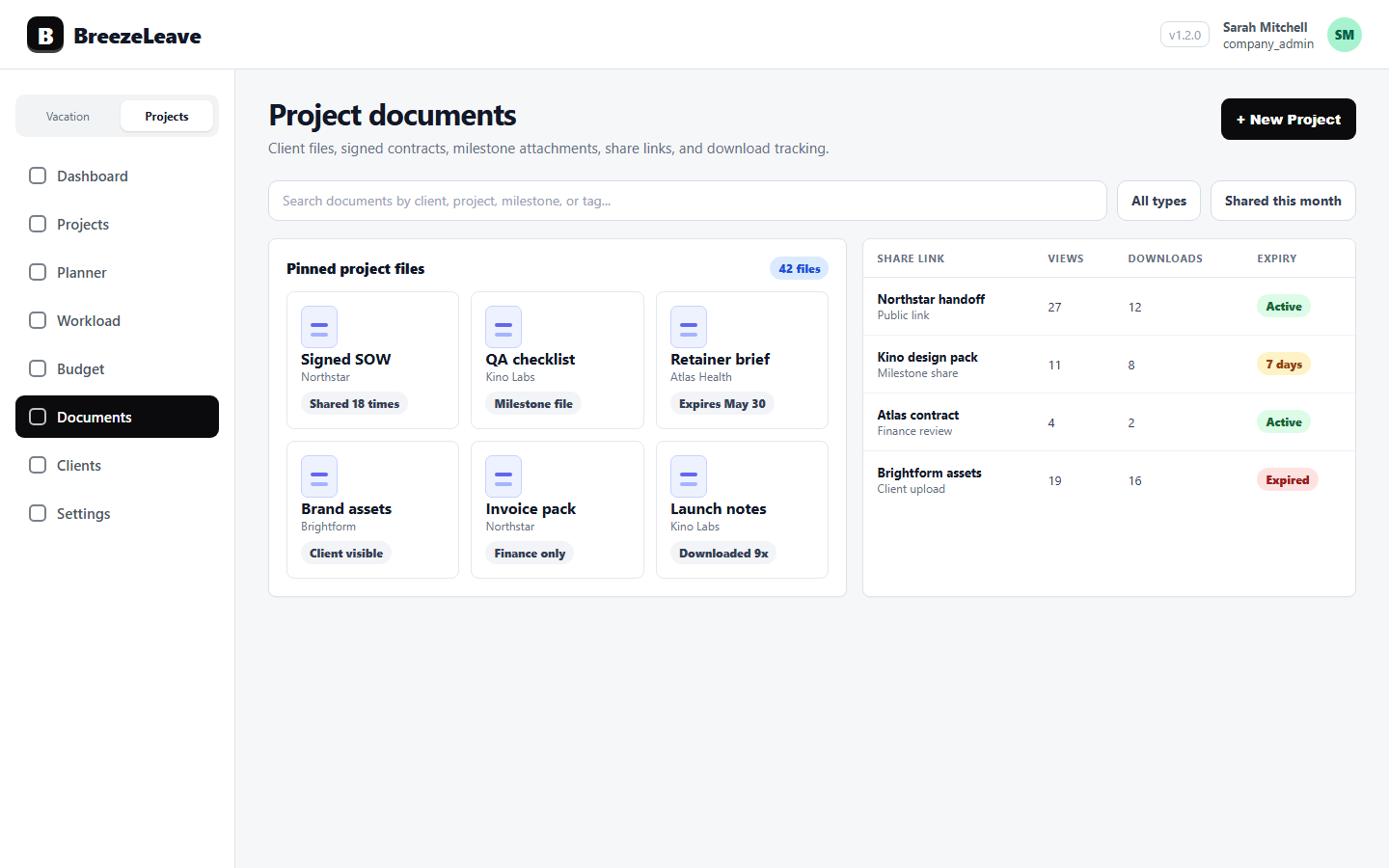
Public share links flip the model. The file lives once, in the project. The link carries an expiry and a password. The view log records who opened it and when. If the link is misused, it can be revoked without recalling thousands of emails. The agency does not gain perfect control, but it gains enough control to act on a problem.
For the underlying product flow, see the project document management page and the project document management for client work article.
Sensitivity levels, in plain language
Not every document needs the same level of protection. Treating them all the same trains the team to click through warnings without thinking. A simple three-level model works:
| Level | Examples | Sharing default |
|---|---|---|
| Internal | Working drafts, internal reviews, agency-only briefs | No external share at all |
| Client-only | Project deliverables, brand guidelines, status reports | Public link with expiry, view log on |
| Sensitive client | Signed contracts, statements of work, NDA documents, payment terms | Public link with expiry, password, view log on, retention rule applied |
The client owner picks the level when the document is uploaded, not when the link is generated. That avoids the Friday afternoon mistake where everything defaults to the loosest option because nobody had the patience to set it correctly.
Expiry: short by default
A link that never expires is a link that will be used five years from now by someone who has forgotten the agency exists. Default expiries should be short and project-scoped:
- Active project deliverables: 30 days, with renewal on request.
- Signed contracts shared for review: 7 days.
- Status reports: 14 days.
- Final handover packages: 60 days, with retention rule applied at expiry.
Clients who genuinely need the link again can ask for a new one. That request creates a paper trail. The previous version was not sitting forgotten in someone's inbox for five years.
Passwords belong to a different channel
If the link is in an email, the password should not be in the same email. The point of a password is to add a second factor that does not travel with the file. Put it in Slack, Teams, SMS, or a phone call. Anything that the same forwarded email cannot expose.
Two practical rules:
- One password per document, not a reused agency password.
- Passwords expire when the link expires; if the link is renewed, generate a new password.
These rules sound bureaucratic until the agency has to investigate why a competitor saw a draft proposal. At that point, a logged per-document password becomes evidence.
View and download tracking, used calmly
View logs answer two operational questions: did the client open the file, and who exactly opened it. Both are useful in the right moment.
The first matters when the project is waiting on client feedback. If the deliverable was sent three days ago and the link has not been opened, the silence is not "they are reviewing it." It is "they have not seen it yet." A short nudge from the project manager is more honest than waiting another week.
The second matters before a contract close or a sensitive moment. If a signed statement of work shows views from three IP addresses in two countries when only the client's office should be opening it, the agency has a reason to ask a careful question. Not an accusation, a question.
Track quietly. Do not turn the view log into a guilt tool. The point is to make decisions on signal, not to surveil clients.
When a team member leaves
Departure is the biggest hole in agency document security. Slack access is revoked the same day. Email is closed. The shared drive is usually fine. But the dozens of public share links that person generated over three years can keep working long after she is gone.
The fix is a leaving checklist that includes "audit the public links this person created in the last 90 days; revoke or reassign each one." Project documents tied to the project record make this easier because the links are not scattered across personal cloud folders. They are listed under the projects the person owned.
For the related role-based access view, see role-based access for leave management.
A worked example: sharing a signed contract
The legal team has finished a signed master services agreement. The client owner needs to send it to two contacts at the client. Here is how the checklist runs.
- Upload the file under the correct project and client. Mark sensitivity as "sensitive client."
- Generate a public share link with a 7-day expiry, password protection on, and view tracking on.
- Send the link from the agency address to the two named contacts only.
- Send the password through a different channel (a confirmed mobile number).
- Verify the view log after 24 hours. If the link has not been opened, send a polite nudge.
- At 7 days, the link auto-expires. The retention rule keeps the file inside the project record.
Six steps, under five minutes, and the contract never leaves the project. Compare with attaching the PDF to an email: zero protection, zero log, zero way to revoke. The five minutes are cheap.
Mistakes to avoid
- "One link for the whole client." Reusing a link across multiple deliverables means revoking it breaks several handoffs at once. Use one link per file.
- Forwarded links. If a recipient asks for the link to share with a colleague, generate a new link for that colleague. Do not let the original be forwarded silently.
- Indefinite expiry. The convenience is not worth the long-tail risk.
- Passwords inside the same email. Cancel the second factor by definition.
- Tracking without acting. If the agency never looks at the view log, the tracking is decorative.
A 10-minute weekly review
Once a week, the operations lead spends 10 minutes on the document register: which links expired, which links are about to expire, which links have unusual view activity, which projects have files with no sensitivity label. The point is not to find problems every week. The point is to notice the one week when something is off.
For a related operational rhythm, see the agency sales-to-delivery handoff checklist.
Make Friday afternoon boring
The goal of this checklist is to make the 17:40 share decision unremarkable. The PM picks the project, uploads the file, sets the sensitivity, generates a link with expiry and password, sends the password through a second channel, and goes home. No attachment in an email. No "I will fix it Monday." No three-week-later surprise about who else saw the file.
Ready to put project documents, public share links, expiry, passwords, and view tracking next to the projects they belong to? Manage project documents with public share links in BreezeLeave.