Logged Hours Hygiene for Agency Teams: Fix Missing Time Before Month Close
A practical logged-hours hygiene workflow for agencies using expected vs logged hours, no-log periods, unmapped users, daily drilldowns, and CSV exports.
Missing time logs rarely look urgent on Tuesday. One designer forgot to start a timer. One developer logged everything against the wrong ClickUp card. A new contractor has time entries in ClickUp, but their user is not mapped correctly. None of that feels like a crisis while the work is moving.
Then month close arrives, and the same small gaps become a reporting problem. Project margins look cleaner than they are. Utilization looks lower than reality. Finance asks for corrections after the team has already moved on to the next sprint and nobody remembers whether Tuesday was discovery, QA, client calls, or cleanup.
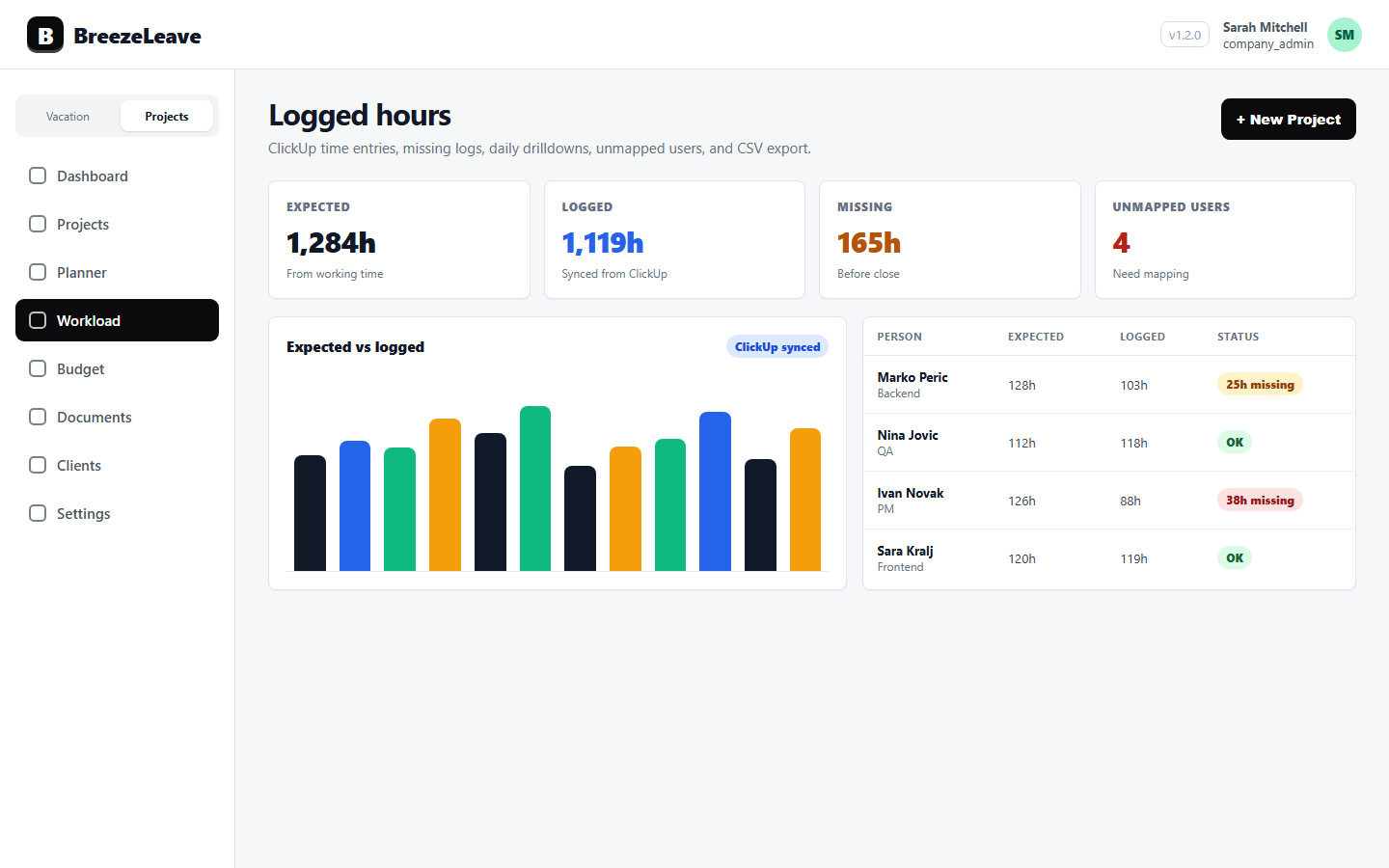
Logged-hours hygiene is the boring weekly habit that prevents that scramble. BreezeLeave helps agencies review expected vs logged hours, no-log periods, unmapped ClickUp users, daily person drilldowns, and CSV exports so time data can be fixed while the week is still fresh.
Treat time hygiene as project operations, not policing
The goal is not to catch people doing something wrong. Most missing time is ordinary process friction: a busy delivery week, a person switching between clients, a timer left on the wrong card, or a new teammate whose ClickUp identity has not been connected yet.
A good hygiene process starts from that assumption. Managers should ask, "What needs to be corrected so the project data is trustworthy?" not, "Who failed to log time?" That tone matters. If time review feels punitive, people rush to fill gaps with guesses. If it feels operational, people fix the data while they still remember the work.
Time hygiene is not about watching people. It is about making project decisions from data that is complete enough to trust.
The weekly logged-hours hygiene workflow
The best time to clean time data is before the week hardens into memory. For most agency teams, a 20 to 30 minute review on Thursday afternoon or Friday morning is enough. The process does not need ceremony. It needs the same few checks every week.
- Start with expected vs logged hours. Look for people whose logged hours are far below expected working time after PTO and holidays are accounted for.
- Open no-log periods. Check whether the gaps are real missing logs, planned absence, onboarding time, internal work, or a tracking mistake.
- Resolve unmapped users. If ClickUp time exists but is not tied to the right BreezeLeave user, fix the mapping before project reports depend on it.
- Use daily drilldowns for context. Review the exact days with missing or odd entries instead of asking people to reconstruct the whole week.
- Export when finance needs the file. Use CSV exports for month-close review, client analysis, or a clean handoff to accounting.
This workflow works because it keeps the review small. You are not auditing every minute. You are finding the gaps that would distort project budgets, workload planning, and delivery conversations if they stayed unresolved.
What to look for in expected vs logged hours
Expected hours give the review a baseline. If someone was expected to work 32 hours this week because they took one day of leave, 30 logged hours may be perfectly fine. If someone was expected to work 40 hours and has 9 logged hours by Friday, the team needs context before using that data in a budget or capacity conversation.
The important part is comparing time against the real working calendar, not against a flat assumption that everyone should log the same number every week. PTO, public holidays, part-time schedules, and internal responsibilities all change what "normal" looks like.
| Signal | What it may mean | Best next step |
|---|---|---|
| Low logged hours | Missing logs, internal work, PTO, or a quiet week | Check daily detail before asking for corrections |
| No-log period | A full working day or several days with no time entries | Confirm whether the person worked, was absent, or tracked elsewhere |
| Unmapped user | ClickUp time exists but is not connected to the right person | Fix the user mapping before reviewing utilization or budgets |
| Odd daily pattern | One very large day, duplicated work, or time on the wrong card | Review the day-level entries while the work is still memorable |
This is where BreezeLeave's connection between leave and logged hours becomes useful. A person with no logs on Wednesday may have taken approved leave. A person with no logs on three expected working days may need a quick nudge. Those are very different situations, and the review should treat them differently.
Handle missing logs without creating a blame loop
Missing logs should produce a short, specific follow-up. Vague messages like "please fix your time" usually create bad data because the person has to guess what the manager saw. A useful follow-up names the date, the project context, and the correction needed.
For example: "Tuesday and Wednesday show no ClickUp time, but you were expected to be available. Were those client hours, internal work, or leave that we need to record differently?" That gives the person a clean path to fix the issue without feeling accused.
A few common cases come up again and again:
- The forgotten Friday. Someone finished client work but did not log it before the weekend. A Monday reminder usually fixes it with accurate memory.
- The wrong card. Hours were logged, but against a generic task or an old ClickUp card. The project total needs correction even though the person tracked time.
- The unmapped contractor. A new contributor has ClickUp entries, but those entries are not attached to the right BreezeLeave profile. Utilization and budget views will be wrong until the mapping is fixed.
- The real no-work day. The person was sick, on approved leave, or unavailable for a reason that belongs in the leave record rather than in project time.
Notice that only one of those cases is "someone forgot." The rest are system context, mapping, classification, or absence questions. That is why a hygiene review should be led by operations and delivery context, not suspicion.
Use daily drilldowns when the summary is misleading
Weekly totals are useful for spotting a problem, but they rarely explain it. A person can have 40 logged hours and still have a hygiene issue if the hours are bunched into the wrong day or attached to the wrong work. Daily drilldowns help managers move from "something looks off" to "this is the exact entry we need to fix."
This matters most when a project is close to budget, a retainer is near its weekly allowance, or a client asks why a deliverable took longer than expected. Before turning that into a delivery judgment, inspect the daily record. Sometimes the work really took longer. Sometimes the time is simply sitting in the wrong place.
A practical review habit
If a weekly total changes a project decision, open the daily detail first. Do not discuss margin, capacity, or scope creep from a summary number that might still include missing, unmapped, or misclassified time.
Clean time data before month close
Month close should be a confirmation step, not the first time anyone looks at missing hours. If finance has to chase time corrections after the month ends, the team is already working from stale memory. The longer the delay, the more the corrections become estimates.
A cleaner rhythm is simple:
- Delivery managers review logged-hours hygiene weekly.
- Operations resolves unmapped users and obvious configuration issues.
- Team members correct missing or misplaced entries while the work is fresh.
- Finance exports the cleaned data for month-end review.
CSV exports are useful here because they give finance a review file without asking project managers to rebuild the story manually. The export is not the source of discipline. The weekly hygiene process is. The export is just the handoff once the data is in better shape.
Connect hygiene to budget and capacity decisions
Time hygiene is not separate from delivery. A project that looks profitable with missing time may not be profitable. A person who looks underloaded may simply have incomplete logs. A card that looks easy may be carrying hidden effort somewhere else.
Use the logged-hours workflow together with ClickUp time tracking, project budget tracking and workload capacity planning. Clean logged hours make budget reviews less speculative and capacity planning less dependent on gut feel.
This is especially important for agencies because the same hour can affect several decisions at once. It can change project margin, retainer burn, staffing pressure, and the next week's delivery plan. If the hour is missing, unmapped, or sitting on the wrong card, every downstream conversation gets a little weaker.
The standard is not perfect time tracking. The standard is catching the gaps early enough that managers can still fix them accurately.
Keep the process lightweight enough to survive
The mistake is turning time hygiene into a heavy audit. If the weekly review takes two hours, managers will skip it when delivery gets busy. Keep the process focused on the exceptions that matter: missing expected time, no-log periods, unmapped users, and entries that would distort a project or finance review.
A healthy agency rhythm looks plain because it is plain. Review the exceptions weekly. Correct the obvious gaps. Fix mappings as soon as they appear. Export clean data for finance. Then use the numbers with a little more confidence when deciding whether a project needs scope discussion, staffing support, or a budget adjustment.
That is the point of logged-hours hygiene. Not more administration. Less guessing.